Quick Facts
- Availability: Generally available from October 1st to November 1st.
- Compatibility: Works with Nest Doorbell (Battery), Nest Doorbell (Wired, 2nd Gen), and Nest Hello (1st Gen).
- Subscription: No Nest Aware subscription is required to access seasonal themes.
- Auto-Reset: Devices automatically revert to the default chime on November 1st.
- Indoor Requirements: Requires Visitor announcements to be enabled for smart speaker playback.
- App Versions: Google Home app version 2.44.1.8 or higher is recommended for the best experience.
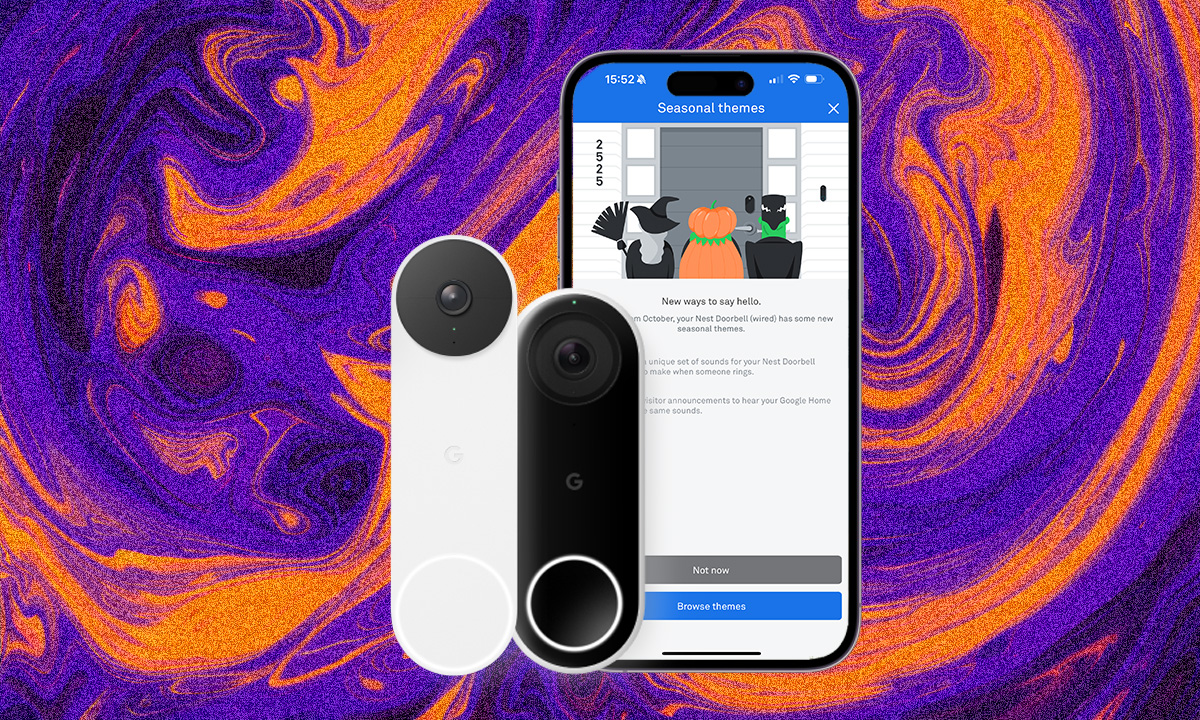
To change your nest doorbell sounds to halloween themes, open the Google Home app and select your doorbell device. Tap the Settings icon, navigate to the Doorbell section, and select Doorbell theme. From there, choose your preferred spooky sound, such as a howling werewolf or a cackling witch, and save the changes to update your exterior chime. If you are using a 1st Generation Nest Hello, you will need to perform these steps within the original Nest app settings menu instead.
Compatibility: Checking Your Hardware and App Version
Before you can start greeting trick-or-treaters with an evil laugh, you need to ensure your hardware is ready for the update. Google has released several versions of its video doorbells over the years, and the path to festive audio varies slightly depending on whether you have a legacy device or the latest hardware. The 2026 seasonal update is compatible with the Nest Doorbell Battery, the Nest Doorbell Wired 2nd Gen, and the original Nest Hello.
It is important to understand the nest seasonal chimes availability dates for halloween to avoid frustration. Google typically pushes these updates server-side, meaning the options only appear in your app during a specific window. Historically, seasonal ringtones are available for a limited time each year, usually starting on October 1st and disappearing on November 1st. If you are looking for these settings in September or November, they simply won't be visible in the menu.
Software also plays a critical role in the smart home automation experience. To ensure the doorbell theme settings appear correctly, verify that your Google Home app is updated to version 2.44.1.8 or higher. Keeping your firmware and app version current ensures that the handshake between Google’s servers and your local device happens without a hitch. If you have the newer battery-powered model, checking the nest doorbell battery holiday chimes setup guide within the app's help section can also provide real-time firmware status.
How to Set Halloween Sounds in the Google Home App (2nd Gen/Battery)
For those using the modern Google Home ecosystem, the process is streamlined to fit into the broader smart home management interface. The latest generation of doorbells relies heavily on the Google Home app for all audio customization and video doorbell notifications. Because these devices are built with newer processors, the transition between sounds is often faster than on legacy hardware.
To begin the transformation, launch the Google Home app and locate your doorbell's card on the main dashboard. Tap the card to open the live feed, then look for the gear icon in the top right corner to access the device settings. Within this menu, scroll down until you see the doorbell settings section. Here, you will find the doorbell theme option. This is the google home app doorbell theme settings location that many users struggle to find initially because it is nested under the hardware specific settings rather than general notifications.
Once you enter the theme menu, you will see a list of available seasonal audio themes. Select your favorite spooky sound and hit save. You might notice that newer 2nd Gen models sometimes offer evergreen themes—like a classic bird chirp or a modern electronic tone—that stay available year-round. However, the true halloween spirit is found in the limited-edition sounds that only appear during October.
How to Set Halloween Sounds in the Nest App (1st Gen/Hello)
If you are still rocking the original Nest Hello, you are using a piece of hardware that many enthusiasts still consider the gold standard for its continuous recording capabilities. While Google has migrated many features to the Home app, legacy hardware setup for themes still primarily happens in the Nest app. Even if you can see your video feed in the Google Home app, you must go back to the source to change the nest doorbell sounds.
Open the Nest app and select your doorbell from the home screen. Tap the settings gear in the top right and look for the doorbell chime option. Within this sub-menu, there should be a toggle or a selection for seasonal themes. It is worth noting that for 1st Gen users, the indoor chime relay behaves differently. While the exterior unit will blast the spooky sound to your visitors, your internal mechanical chime will likely still produce the traditional ding-dong. This is because the physical plunger in a mechanical chime is not capable of reproducing complex digital audio.
To get the full effect inside your home, you will want to lean on Google Assistant integration. By using a Nest Mini or Nest Hub as an internal ringer, you can sync the digital audio so the cackling witch echoes through your hallways at the same time it surprises the person on your porch.
The 2026 Spooky Sound Lineup
This year's collection of audio themes is designed to offer something for every level of fright, from whimsical and family-friendly to genuinely eerie. The list of google nest spooky holiday sounds 2026 includes several returning favorites and a few new additions that leverage the improved speakers on the latest Nest models.
The current inventory features:
- Howling Werewolf: A deep, resonant baying that is perfect for foggy October nights.
- Cackling Witch: A high-pitched, classic laugh accompanied by the sound of a bubbling cauldron.
- Skeleton Dance: A rhythmic, xylophone-heavy tune that feels more festive and "Nightmare Before Christmas" in style.
- Spooky Raven: A subtle, atmospheric sound of flapping wings and sharp croaks.
- Ghostly Boo: A soft, ethereal whisper followed by a classic boo that won't scare away the younger trick-or-treaters.
- Evil Laugh: A heavy, dramatic villain laugh that makes a bold statement at your front door.
One of the best aspects of these festive audio themes is that they are entirely free. According to CNET, users do not need a paid Nest Aware subscription to activate these seasonal chimes. This accessibility makes it one of the easiest ways to add seasonal home decor to your smart home without an extra monthly cost.
Troubleshooting: Why You Can’t Hear the Spooky Chime
A common complaint among users is that the nest hello seasonal chimes not working indoors as expected. You might see a visitor on your camera, hear the howling wolf from the exterior doorbell, but only hear a standard chime inside. This usually boils down to how your indoor chime is configured.
If you have a traditional wired chime, the seasonal sounds will never play through that hardware. To fix this, you need to enable visitor announcements in your device settings. This feature allows your compatible Google Assistant-enabled speakers and displays to act as your internal chime. When a visitor presses the button, the smart speakers will broadcast the holiday-specific audio throughout the house.
Another point of confusion is the end of the season. It is important to remember that Google Nest doorbells automatically revert to the default tone once the holiday period ends. On November 1st, your doorbell will go back to its standard ding-dong, and the theme selection menu will vanish from the app. If your doorbell stops making the spooky sound on November 1st, it isn't a bug—it's the system working as designed to transition your home into the next season.
FAQ
How do I change the chime sound on my Nest doorbell?
To change the chime, you must access the settings of your specific doorbell within the Google Home or Nest app. For newer models, navigate to the device card in the Google Home app, tap the gear icon, select Doorbell, and then choose Doorbell theme. For older Nest Hello models, you should use the Nest app settings to find the seasonal chime options.
Why is my Nest doorbell not making any sound?
If your doorbell is silent, first check that the indoor chime toggle is turned on in your settings. If the exterior unit isn't making sound, ensure your volume is turned up in the app and that the device is receiving enough power. For seasonal chimes specifically, remember that mechanical chimes only support the standard ding-dong, so you will need to enable visitor announcements on a smart speaker to hear the digital themes.
Can I use seasonal ringtones on my Nest doorbell?
Yes, seasonal ringtones are available for all Nest doorbell models, including the 1st Gen Nest Hello and the 2nd Gen Wired or Battery models. These sounds are typically available from October 1st through November 1st for Halloween, with other themes appearing for the winter holidays. You do not need a subscription to use these themes.
Can Google Home speakers announce Nest doorbell visitors?
Google Home and Nest speakers can absolutely announce visitors. By enabling the visitor announcements feature in your doorbell settings, your speakers will not only tell you that someone is at the door but also play the specific seasonal chime you have selected. This is the best way to ensure the holiday spirit is felt both inside and outside the home.
How do I turn off the indoor chime for my Nest doorbell?
If you want to silence your indoor chime—perhaps for a napping baby or during a quiet evening—you can go into the doorbell settings in the Google Home or Nest app and toggle off the Indoor chime option. This will prevent your mechanical chime or smart speakers from sounding while still allowing you to receive notifications on your phone.
Using these simple steps, you can turn your front porch into a festive entrance that delights (or scares) everyone who stops by. It’s a small detail that makes a big impact on your overall holiday experience. For more tips on how to change nest doorbell ringtone to halloween and other ways to maximize your smart home, keep your firmware updated and stay tuned for the winter holiday chime updates coming in December.