Quick Facts
- Feature: Ring Bird's Eye View utilizing 3D Motion Detection.
- Compatible Hardware: Pro models including Video Doorbell Pro 2, Floodlight Cam Wired Pro, and Spotlight Cam Pro.
- Optimal Height: 8 to 10 feet (2.5 - 3 meters) from the ground.
- Optimal Tilt: 45 to 60 degrees for proper horizon leveling.
- Detection Range: Precise tracking for events occurring up to 30 feet (9 meters).
- Technology: Radar-based sensors instead of traditional Passive Infrared (PIR).
Ring Bird's Eye View utilizes radar-based 3D Motion Detection to identify the exact path a visitor takes on your property. By using overhead satellite imagery, the system plots movement trajectories as dots on a map, providing spatial awareness that traditional motion zones cannot offer. This feature is primarily available on Pro models like the Floodlight Cam Wired Pro and Spotlight Cam Pro, allowing homeowners to see not just that someone is there, but exactly where they went from the moment they stepped onto the property.
Hardware Compatibility: Is Your Ring Device Pro?
Before diving into the software, we need to address the hardware. Not every Ring device is equipped with the radar sensors required for Ring Bird's Eye View. This feature is the hallmark of the Pro line, which uses specialized radar-based sensors to measure the distance and angle of objects in front of the lens.
Currently, the feature is supported by high-end models typically priced between $179 and $269. The compatible lineup includes:
- Ring Video Doorbell Pro 2
- Ring Floodlight Cam Wired Pro
- Ring Spotlight Cam Pro (available in Battery, Plug-in, Wired, and Solar versions)
If you are using a standard Ring Video Doorbell or the entry-level Stick Up Cam, you will likely only have access to standard motion zones which rely on Passive Infrared (PIR) sensors. While PIR is great for basic detection, it lack the depth perception offered by Ring radar motion detection. Upgrading to a Pro model is necessary if you want to eliminate the guesswork of where a visitor traveled before reaching your door. Understanding ring birds eye view path tracking starts with ensuring your device has the physical components to bounce radar waves off moving objects.
Physical Installation: The 45-60 Degree Tilt Rule
In my years of testing smart home gear, I have found that the biggest hurdle to accuracy is almost always the physical installation. Because Ring Bird's Eye View relies on radar, the angle at which the camera sits relative to the ground is vital. If the camera is angled too low, the radar waves hit the ground too early; too high, and they overshoot your property entirely.
For optimal performance of Bird's Eye View on outdoor security cameras, the device should be mounted at a height of 8 to 10 feet (2.5 to 3 meters) from the ground. This height allows the radar to cast a wide enough net to cover the 30-foot detection range without losing resolution.
Furthermore, you must pay attention to the tilt. To ensure accurate motion tracking during Bird's Eye View setup, Ring cameras should be tilted at an angle of 45 to 60 degrees so that the horizon remains level in the field of view. When you optimize Ring motion tracking accuracy, you are essentially ensuring the radar "sees" the world in three dimensions correctly. If your camera is looking straight down at the porch, the radar cannot effectively calculate the distance of a person walking up the driveway.
Expert Tip: Always use the level tool provided in the box or a digital level app on your phone. Even a 5-degree deviation can cause the dots on your Bird's Eye map to appear in your neighbor's yard instead of your own.
Digital Calibration: Mapping Your Property
Once the camera is physically mounted, the next step is the digital handshake between the radar and the map. This is where you configure Ring motion zones using satellite data. Open your Ring app, select your compatible device, and navigate to Motion Settings. From here, you will select 3D Motion Detection to begin the calibration process.
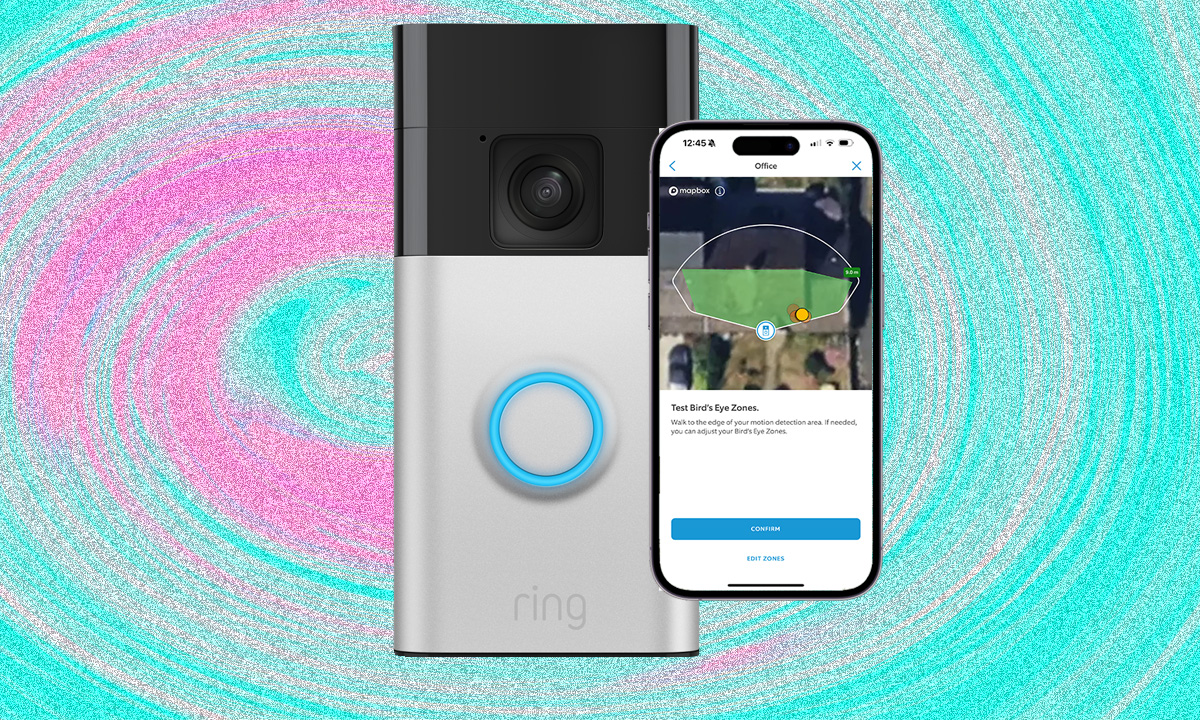
You will be asked to find your home on a satellite map. It is crucial to be precise here; you need to pinpoint the exact location on your house where the camera is mounted. The app will then ask you to define the camera’s orientation. You’ll see a "cone" of detection on the map; rotate this cone until it perfectly aligns with the direction your camera is facing in real life.
How to map property for ring bird's eye view involves setting a detection threshold. This is a digital boundary that tells the radar to ignore anything beyond a certain point—usually 30 feet. By defining these property boundaries, you ensure that a car driving down the street doesn't trigger a motion event, even if it is technically within the camera’s visual field of view.
Optimizing Bird's Eye Zones vs. Traditional Motion Zones
There is often confusion regarding Ring bird's eye view vs motion zones. Traditional motion zones are two-dimensional; they look at pixels changing on a screen. If a tree branch moves or a shadow shifts, a standard motion zone might trigger an alert. Ring Bird's Eye View is different because it uses Bird's Eye Zones, which are powered by radar.
When you configure Ring motion zones with radar, you are setting a "hard" distance limit. For example, you can tell the camera to only send an alert if a person comes within 15 feet of the house. Because the radar measures actual distance, it won't be fooled by a large truck driving by at 40 feet, even if that truck takes up half the visual frame.
To refine your notifications, go into the ring spotlight cam pro birds eye view settings and adjust the sensitivity. High sensitivity is great for long driveways, but if your camera faces a busy sidewalk, you’ll want to pull that detection threshold back to avoid a constant barrage of pings. This results in more relevant real-time notifications and a clearer visual history of movement paths.
Troubleshooting Radar Accuracy and Signal Issues
Even with the best hardware, you might occasionally see "ghost" paths or disconnected dots on your map. If you need to troubleshoot ring radar motion detection accuracy, start by checking your signal strength. Radar data is processed locally, but the overlay of that data onto a satellite map requires a stable Wi-Fi connection. A high RSSI (Received Signal Strength Indicator) in the Ring app can cause delays in how movement trajectories are rendered in your event history.
Environmental factors can also play a role. While radar is generally better than PIR in rain or fog, extremely heavy downpours can occasionally scatter the radar signal. Additionally, ensure there are no large metal objects (like a parked van or a large metal shed) directly in the line of sight of the radar sensor. Metal reflects radar waves and can create "dead zones" where tracking becomes impossible.
Finally, check your mounting height one last time. If the camera has shifted due to wind or a loose bracket, the ring floodlight cam wired pro radar setup will lose its calibration. Re-running the 3D motion detection setup in the app takes less than two minutes and can solve 90% of tracking inaccuracies.
FAQ
What is Ring Bird's Eye View and how does it work?
Ring Bird's Eye View is a feature that uses radar technology to provide an aerial map view of a motion event. Instead of just seeing a video of a person, you see a satellite map with a dotted line showing the exact path they took on your property. It works by sending out radar pulses that bounce off objects to measure their distance and speed with high precision.
Which Ring devices support the Bird's Eye View feature?
This feature is exclusive to Ring's Pro category of devices. This includes the Ring Video Doorbell Pro 2, the Ring Floodlight Cam Wired Pro, and the entire Ring Spotlight Cam Pro series (Battery, Plug-in, Wired, and Solar). Standard models like the Video Doorbell (2nd Gen) or the Stick Up Cam do not have the necessary radar hardware.
How do I set up Bird's Eye View on my Ring doorbell or camera?
To begin the setup, open the Ring app and go to your device dashboard. Tap on Motion Settings, then select 3D Motion Detection. Follow the on-screen prompts to find your home on a satellite map, mark the exact location of your camera, and set your detection distance. You will also need to confirm the camera is mounted at the recommended height and angle.
What is the difference between Bird's Eye View and Bird's Eye Zones?
Bird's Eye View refers to the visual "path" you see in your recorded videos or Live View, showing where someone walked. Bird's Eye Zones are the customizable boundaries you set on a map to trigger those recordings. While standard motion zones look at the camera's visual field, Bird's Eye Zones use radar to only alert you when motion occurs at a specific distance from your home.
Do you need radar for Ring Bird's Eye View to function?
Yes, radar is the fundamental technology that makes Bird's Eye View possible. Traditional cameras use optical sensors that cannot accurately judge distance in three-dimensional space. The radar sensors in Pro models provide the depth data necessary to plot a person's location on a satellite map accurately.