Quick Facts
- Premier Choice for Control: Inoreader offers the most generous free tier with support for up to 150 feeds and advanced filtering capabilities.
- The Simplicity Leader: Feedly remains the most popular option with a user-friendly, magazine-style interface designed for low-friction reading.
- Unified Research Hub: Readwise Reader excels as an all-in-one productivity solution that merges RSS, newsletters, and PDFs into a single workflow.
- The Professional Shift: RSS adoption among professionals increased by 34% year-over-year in 2026 as users sought alternatives to algorithmic timelines.
- Productivity Metric: It takes an average of 23 minutes to regain deep focus after a single digital interruption.
- Market Growth: The global news application market is projected to reach a valuation of $26.23 billion by 2026.
The best RSS readers for productivity in 2026 prioritize intentional content curation over algorithmic feeds. Inoreader is the premier choice for power users, offering advanced scraping and high subscription limits. Feedly excels for those seeking a user-friendly, magazine-style interface for casual reading. Readwise Reader serves as an all-in-one productivity solution by combining RSS feeds with newsletters, PDFs, and ePubs for comprehensive research workflows.
The 2026 Focus Crisis: Why You Need an RSS Reader
We are currently living through what many experts call the "attention recession." In a typical workday in 2026, the average professional navigates a relentless barrage of 117 emails and over 150 instant messages. When you add the lure of AI-driven social media feeds designed to maximize "time on site" rather than "value of information," the result is chronic Information Overload.
The cost of this distraction is quantifiable. Research indicates that once your flow is broken by a notification or an algorithmic rabbit hole, it takes approximately 23 minutes to return to your original task with the same level of cognitive intensity. This is the "Focus Tax" we pay every time we rely on platforms like Google Discover or social timelines for our news.
RSS readers for productivity have become the essential antidote. Unlike personalized aggregators that use AI to guess what might make you click, RSS puts you back in the editor's chair. This shift toward Digital Minimalism is less about seeing less and more about seeing better. By subscribing directly to trusted sources, you eliminate the middleman, the clickbait, and the distraction. As the global news application market reached $22.28 billion in 2025, the trend for 2026 is clear: high-performers are abandoning the "feed" for the "folder."
1. Inoreader: The Power User’s Command Center
If you view information gathering as a competitive advantage rather than a hobby, Inoreader is your primary tool. It has long been favored by researchers, analysts, and developers who need to monitor hundreds of sources without drowning in noise.
The most compelling aspect of Inoreader in 2026 is its sheer capacity. When looking at an Inoreader vs Feedly free plan comparison 2026, Inoreader is the clear winner for those who don't want to pay immediately. It allows for up to 150 feeds on its free tier, whereas many competitors cap users at 100. Furthermore, Inoreader offers native support for newsletter subscriptions and even social media monitoring, allowing you to turn a chaotic Twitter list or a cluttered email inbox into a clean, searchable feed.
What sets it apart for power users is the suite of automation tools. You can create complex rules to automatically tag articles, send specific topics to Slack, or filter out keywords that don't interest you. If you are looking for the best RSS reader for deep work and focus, Inoreader’s "Active Search" and "Global Search" features allow you to find mentions of specific terms across the entire RSS ecosystem, not just your subscribed feeds.
Best if you:
- Need more than 100 subscriptions without paying for a premium plan.
- Want to automate your workflow using rules and filters.
- Require full-text extraction for websites that only provide short snippets in their feeds.
Not ideal if you:
- Prefer a minimalist, "pretty" interface over a functional, data-heavy dashboard.
- Are easily overwhelmed by too many settings and configuration options.
2. Feedly: The Cleanest Entry Point for Professionals
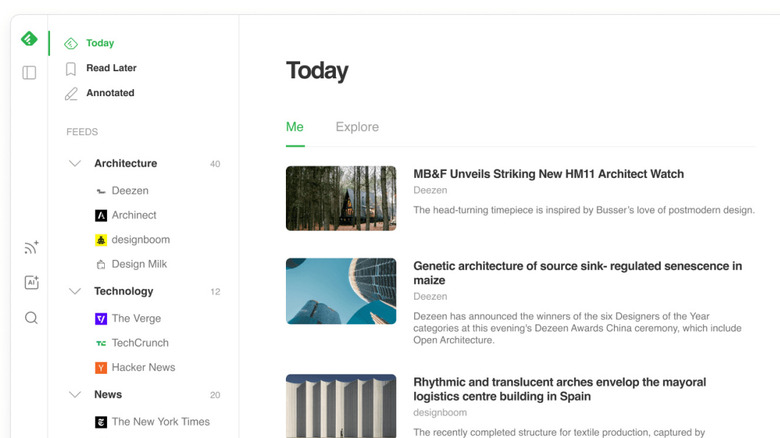
With over 14 million registered users, Feedly is the most widely adopted RSS platform for a reason. It pioneered the transition from the old-school, email-style list view to a modern, magazine-style layout. In 2026, Feedly remains the gold standard for high-level Content Curation that feels sophisticated rather than clinical.
Feedly’s strength lies in its low-friction setup. If you are moving away from social media feeds to reclaim your focus, Feedly provides the most "natural" bridge. Its "Today" view uses a subtle AI assistant named Leo to highlight articles that match your specified interests, but unlike social algorithms, Leo is trained by you, for you. It prioritizes Digital Wellbeing by providing a "Finished" state—once you've read your feeds, the app doesn't try to keep you scrolling forever.
When evaluating Inoreader vs Feedly, many professionals choose Feedly for its superior aesthetic. The spacing, typography, and image handling are designed to reduce cognitive load, making it much easier to skim large volumes of news during a morning coffee break without feeling fatigued.
Best if you:
- Want a clean, beautiful reading experience that mimics a digital magazine.
- Are a professional looking to share curated "Boards" with a team.
- Need a simple, distraction-free environment to start your morning.
Not ideal if you:
- Need more than 100 feeds on a free budget.
- Require deep technical integrations or advanced boolean search logic in the free version.
3. Readwise Reader: The All-in-One Productivity King
The newest entrant to the "big three" has quickly become a favorite in the Personal Knowledge Management (PKM) community. Readwise Reader is not just an RSS aggregator; it is a unified inbox for everything you want to read. In 2026, this app has redefined what we expect from all-in-one reading apps.
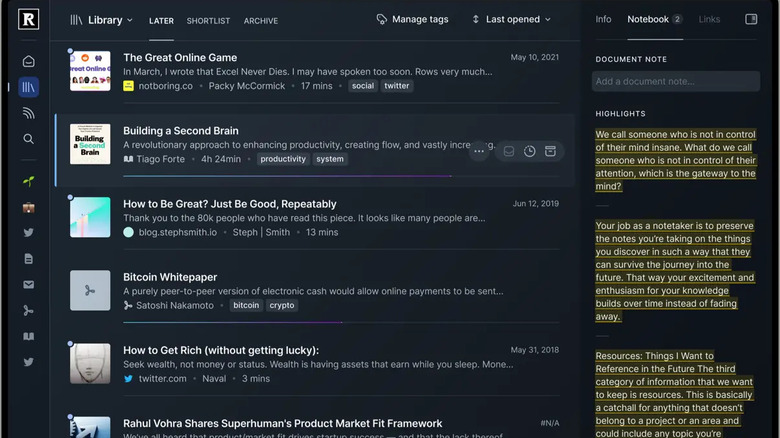
While traditional readers focus on the "now," Readwise Reader focuses on the "forever." It allows you to subscribe to RSS feeds, but it also provides a unique email address for newsletters, a browser extension for "read it later" articles, and the ability to upload PDFs and EPUB files. This Readwise Reader review for research productivity highlights its biggest selling point: everything you highlight in the app can be automatically synced to Notion, Obsidian, or Roam Research.
This is the ultimate tool for those who want to turn consumption into production. It includes modern features like RSS feed readers with AI article summaries, allowing you to get the gist of a long-form essay before committing 20 minutes to read it. By centralizing all-in-one reading apps for newsletters and RSS, it prevents the "tab fatigue" that kills focus.
Best if you:
- Are a student, researcher, or writer who needs to highlight and save information.
- Want one single app to handle RSS, newsletters, and PDFs.
- Already use a note-taking app like Notion or Obsidian.
Not ideal if you:
- Are looking for a forever-free tool (Readwise is a premium, paid service).
- Only read news casually and don't need to save or highlight content.
How to Choose: The Attention Cost Framework
Choosing between these tools doesn't have to be complicated. Instead of looking just at features, look at your "Attention Cost." Ask yourself: how much time am I currently losing to "triage"?
If you spend more than 60 minutes a week just sorting through headlines, you need the automation of Inoreader. The ability to set "if/then" rules will save you hours of manual labor. In an Inoreader vs Feedly for power users debate, Inoreader always wins on time-saved-per-click.
However, if your goal is simply to have a high-quality "daily read" that doesn't feel like work, Feedly is the better investment. The cognitive ease of its design is worth the limitations.
Finally, if you find yourself constantly switching between your RSS app, your Kindle, and your email to find information you "saved for later," the $119/year for Readwise Reader is a bargain. It essentially functions as a second brain, ensuring that your reading time contributes directly to your output.
| Feature | Inoreader | Feedly | Readwise Reader |
|---|---|---|---|
| Primary Goal | Automation & Control | Casual Professional Reading | Research & Synthesis |
| Free Feed Limit | 150 | 100 | N/A (Free Trial Only) |
| Best Feature | Advanced Filtering Rules | Elegant "Today" View | Highlight Syncing (PKM) |
| Platform Sync | Excellent | Excellent | Excellent |
| Learning Curve | Moderate | Low | Moderate |
To properly know how to set up an RSS reader for focus, start with an OPML Migration. Most of these tools allow you to export your current list of sites and import them into a new one. This lets you test the "feel" of each app for a week before committing to a workflow.
FAQ
What is an RSS reader and how does it work?
An RSS reader is a tool that aggregates updates from various websites into one central location. Instead of visiting 20 different blogs or news sites to see if they have posted new content, the RSS reader "pulls" the new articles to you. It works by checking a standardized file (the RSS feed) that most websites update automatically whenever new content is published.
Are RSS readers still relevant today?
RSS readers are more relevant in 2026 than they have been in a decade. As social media platforms become increasingly cluttered with advertisements and AI-generated "slop," professional users are returning to RSS to ensure they don't miss important updates from trusted sources. RSS provides a chronological, curated experience that algorithms cannot replicate.
Is there a mobile app for reading RSS feeds?
Yes, all three of the top picks—Inoreader, Feedly, and Readwise Reader—offer high-quality mobile applications for iOS and Android. These apps feature cross-platform syncing, meaning you can start an article on your desktop during your lunch break and finish it on your phone during your commute without losing your place.
How do I choose the right RSS reader for my needs?
Choosing the right reader depends on your volume of information. If you follow hundreds of sources and need to filter them strictly, go with Inoreader. If you want a clean, visually appealing way to browse 20–50 favorite sites, Feedly is best. If you are a researcher who needs to highlight text and sync it to a database, Readwise Reader is the superior choice.
How do I add a website to an RSS feed reader?
Adding a site is usually as simple as copying the website's URL and pasting it into the "Add Content" or "Follow" search bar within your reader. The app will automatically detect the RSS feed. For sites that don't have a visible feed, power tools like Inoreader can often "scrape" the site to create a custom feed for you.





