Quick Facts
- Market Trend: According to the International Data Corporation (IDC), less than 10% of the laptops sold globally in 2022 featured built-in optical drives.
- Design Trade-off: Removing the internal drive saves between 9.5 mm and 12.7 mm of vertical space within the laptop chassis.
- Consumer Shift: U.S. consumer spending on physical media like DVDs and Blu-rays fell below $1 billion in 2024, a significant year-over-year decline.
- Primary Alternative: A portable disc drive for laptop connected via USB is the standard replacement for internal hardware.
- Software Reality: Modern operating systems like Windows 11 lack native DVD playback software, requiring third-party tools like VLC.
- Backup Strategy: Modern data safety relies on the 3-2-1 Backup Strategy, combining local external drives and cloud synchronization.
Modern laptops have eliminated internal optical drives to prioritize thinner, lighter chassis designs and make space for larger batteries and faster Solid State Drives storage. This shift was accelerated by the widespread availability of high-speed broadband, which replaced physical media with streaming services, cloud storage, and digital software downloads for most users. If you need to access discs, an external usb optical drive is the standard replacement for a built-in laptop dvd drive.
The Disappearing Act: Why Laptops No Longer Have CD/DVD Drives
As a computing editor, I’ve seen the internal laptop dvd drive go from a mandatory feature to a relic of the past. The timeline for this disappearance isn’t just a random choice by manufacturers; it was a calculated move to meet the demands of modern users who prioritize portability and battery life above all else.
The shift began in earnest around 2007 with the rise of the netbook, exemplified by the Asus Eee PC, which ditched the drive to achieve a tiny footprint. However, the real nail in the coffin was the 2012 MacBook Pro. When Apple removed the internal SuperDrive from its flagship professional machine, it signaled to the entire industry that the era of physical media was ending. By removing a component that required significant chassis thickness, engineers could finally use that saved space for more cooling fans or larger lithium-ion batteries.
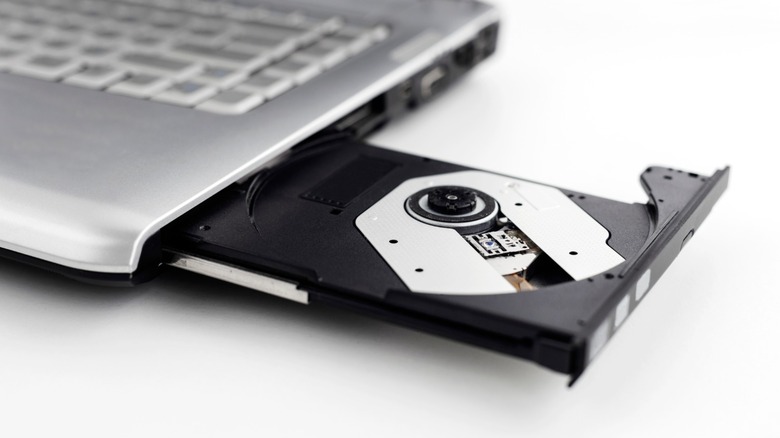
From a technical standpoint, the space savings are massive. A standard slimline drive occupies roughly 9.5 mm to 12.7 mm of vertical space. In an era where ultrabooks are often less than 15 mm thick total, a disc drive is physically impossible to include. Furthermore, the rise of Solid State Drives meant that the mechanical, slow nature of an optical drive became a performance bottleneck. Today, most users would rather have a second NVMe SSD slot or a larger thermal solution to keep their processor from throttling.
The decline of consumer interest has been equally dramatic. As high-speed internet became ubiquitous, the need for physical software distribution vanished. Why wait for a disc to arrive in the mail when you can download a 50GB game on Steam in minutes? The market reflected this quickly. By 2024, U.S. home video revenue from physical formats fell below $1 billion, representing a 23.4% drop from the previous year. For laptop manufacturers, keeping a feature that only a fraction of people use—and that makes the device bulkier and more expensive—simply doesn't make sense.
Best External Optical Drive Alternatives for 2026
If you belong to the group that still has a deep library of physical media or needs to burn archival discs, don't worry. You don't need to hunt for a used, bulky machine from 2015. The solution is a portable disc drive for laptop. These devices are essentially the same internal hardware housed in a slim external enclosure, connecting via a single cable.
When choosing a usb dvd reader, you generally have three categories to consider:
| Drive Type | Connectivity | Best For | Compatibility |
|---|---|---|---|
| Standard USB 2.0/3.0 DVD | USB-A | Casual use, old software | Windows, macOS, Linux |
| USB-C Portable DVD/CD | USB-C | Modern ultrabooks, MacBook Air | Windows, macOS, Android |
| External Blu-ray Writer | USB 3.1 / USB-C | 4K movies, high-capacity backups | Windows, macOS (with software) |
| M-Disc Archival Drive | USB 3.0+ | 1,000-year data storage | Professional Archivists |
For most people, an affordable usb dvd readers for occasional use is more than enough. These are plug-and-play devices that draw power directly from your laptop. However, if you are a professional or a "data hoarder," you might look into Media Archiving technologies like M-Disc. Unlike standard DVDs, which use an organic dye that can degrade over time (known as "disc rot"), M-Discs use a rock-like data layer that is resistant to light, temperature, and humidity.
When looking for the best external dvd drive for laptops without disc drives, I always recommend looking for one with a built-in USB-C cable. This eliminates the need for annoying dongles if you are using a modern Dell XPS or MacBook. Also, pay attention to power requirements. Some older drives might require two USB ports to get enough juice, but most modern versions operate fine on a single connection.
The Software Gap: How to Actually Play Discs on Windows 11
The hardware is only half the battle. Many users buy a usb dvd reader, plug it into their new laptop, insert a movie, and... nothing happens. This is because modern operating systems have removed the codecs required to decode physical video discs.
Microsoft removed native DVD playback from Windows 8, and it remains absent in Windows 11. They want you to buy their "Windows DVD Player" app from the Microsoft Store, but as a technical editor, I suggest you save your money. Here is how to install software from a disc on a new laptop and watch movies without spending extra:
- Connect the Hardware: Plug your external usb optical drive into your laptop. Most modern systems will recognize it immediately as a "Removable Storage" device.
- Install VLC Media Player: This is the gold standard. It is free, open-source, and includes all the necessary codecs to play almost any disc format, including DVDs and Blu-rays.
- Handle Protected Content: If you are trying to play a commercial movie, the disc likely has Digital Rights Management (DRM). Software like VLC can handle most DVD encryption, but for 4K Blu-rays, you may need licensed software like CyberLink PowerDVD.
- Disc Ripping: If you want to stop carrying the drive altogether, consider a process called Disc Ripping. Using a tool like Handbrake, you can convert the physical movie into a digital file (MP4 or MKV) and store it on your laptop's SSD.
If you are trying to install old software or drivers from a disc, simply open the file explorer, navigate to the drive, and look for a file named "setup.exe" or "install.exe." Keep in mind that many old programs designed for Windows 7 may require you to run them in "Compatibility Mode" to work on Windows 11.
Advanced Storage: Beyond Physical Media
While we’ve discussed how to bridge the gap with external hardware, it’s worth asking: do you really need a laptop dvd drive in 2026? For most, the answer is a shift toward a more robust digital ecosystem.
The current industry standard for data safety is the 3-2-1 Backup Strategy. This means having 3 copies of your data, stored on 2 different types of media, with 1 copy located off-site. In the past, the "2 different media" might have been your hard drive and a DVD-R. Today, that usually looks like your laptop's internal SSD, a high-speed external SSD, and an off-site cloud provider.
Cloud Synchronization services like OneDrive, Google Drive, and Dropbox have made the "burning to a disc" workflow obsolete for sharing files. They offer version history and instant access from any device, something a physical disc simply can't do. Furthermore, for those wondering can you add a dvd drive to a laptop internally, the answer is almost universally "no" for modern thin-and-light designs. Most laptops don't even have the internal SATA connectors required for an optical drive anymore.
However, for those with massive collections of photos or sensitive documents, physical media still has a place in "cold storage." This is where you store data that you don't need to access frequently but must keep safe from cyberattacks. An external drive that is unplugged and sitting on a shelf cannot be hacked.
FAQ
Do modern laptops still have DVD drives?
Very few. Less than 10% of laptops sold today include them. You can still find them on a handful of ruggedized "toughbooks" or thick, budget-tier 17-inch desktop replacement laptops, but they are becoming increasingly rare. Most manufacturers have moved exclusively to external solutions to keep laptops thin.
How can I play a DVD on a laptop without a disc drive?
The easiest way is to purchase a plug-and-play usb dvd reader. Once connected to your USB port, you will also need to download a media player like VLC, as Windows 11 and macOS no longer include the software needed to play DVD movies out of the box.
Can I install an internal DVD drive in my laptop?
Generally, no. Modern laptop chassis are designed with specific internal layouts that do not include the space or the necessary SATA data and power connections for an optical drive. If your laptop didn't come with one, it is almost impossible to add one internally.
Are external DVD drives compatible with all laptops?
Yes, as long as your laptop has a USB-A or USB-C port. Most external drives are "class compliant," meaning they don't require special drivers. They will work across Windows, macOS, and even most Linux distributions.
Does an external DVD drive need its own power source?
Most modern portable disc drive for laptop models are "bus-powered," meaning they draw all the electricity they need through the USB cable. However, some high-performance Blu-ray writers or older models may come with a "Y-cable" that requires two USB ports to ensure stable operation during the burning process.
In summary, the era of the internal laptop dvd drive has passed, but the utility of physical media hasn't disappeared entirely. By picking up a reliable external usb optical drive and pairing it with the right software, you can maintain access to your disc library while enjoying the benefits of a modern, ultra-thin PC. Whether you are an archivist or just someone who likes to watch old movies, the transition to external hardware is a small price to pay for the massive gains in laptop performance and portability we see today.