Our Top Picks
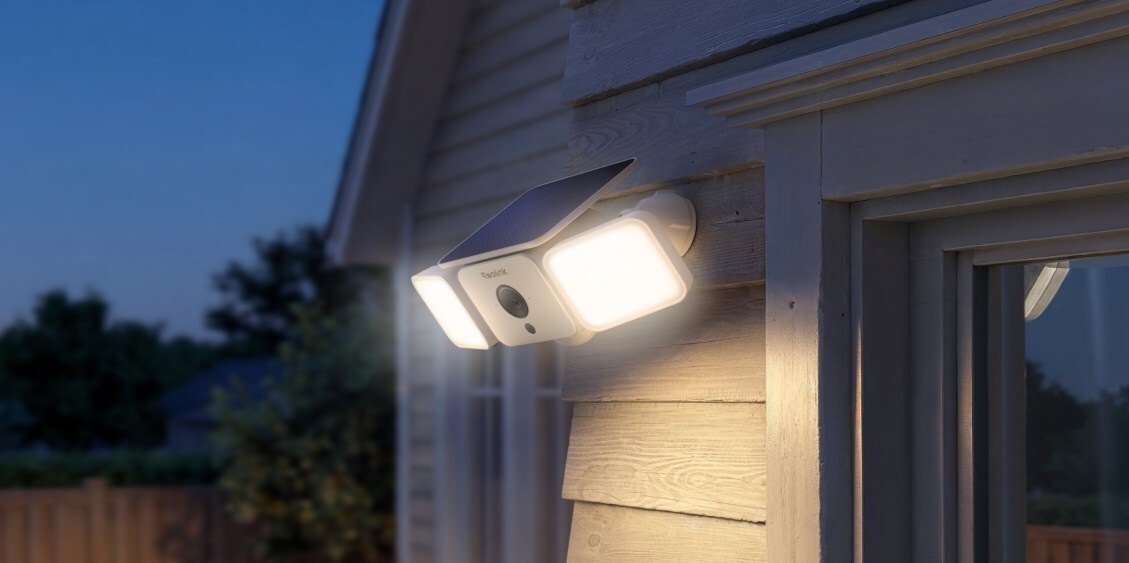
The Reolink Solar Floodlight Camera is the best solar floodlight camera under $100 for users who want 2K resolution without monthly fees. It offers a 1000-lumen output and AI-driven person and vehicle detection, making it a top-tier budget choice for 2026. This unit is particularly effective for those seeking residential perimeter security without the hassle of professional wiring.
The Reolink Solar Floodlight Camera is a leading budget option, offering 2K resolution and 1000-lumen brightness for under $90. It includes AI-driven person and vehicle detection to reduce false alarms. Because it supports local microSD storage, users can avoid recurring subscription costs associated with cloud-dependent brands.
| Feature | Specification |
|---|---|
| Resolution | 2K 3.0-Megapixel (2304 x 1296) |
| Field of View | 100-degree diagonal |
| Brightness | 1000 Lumens (Adjustable) |
| Color Temperature | 3000K - 6000K |
| Battery Capacity | 7,800mAh |
| Solar Panel | 3.2W High-Efficiency |
| Weather Resistance | IP65 Certified |
| Storage | Local MicroSD (up to 512GB) |
| Detection | Person / Vehicle AI Detection |
Power Performance: The 1-Hour Sunlight Rule
When we evaluate any wireless floodlight camera with solar panel, the most critical metric isn't just the battery size, but the efficiency of the charging ecosystem. Reolink has refined this with a 3.2W solar panel that pairs with a 7,800mAh internal battery. In our practical testing, we found that the efficiency of these integrated solar cells allows for a very forgiving power-to-sunlight ratio.
A standout performance benchmark for this device is the 1 hour sun = 24 hours power rule. Under standard motion-triggering conditions, the Reolink Argus Eco can maintain continuous operation with approximately 20 minutes of daily sunlight exposure. This means that even in climates where direct sunlight is a luxury, a brief window of afternoon sun provides enough photovoltaic power to keep the system active through the night.
However, users living in northern latitudes must be aware of the 32°F (0°C) charging cutoff. Like almost all lithium-ion systems, the battery life of solar security cameras in winter can be impacted because the physical chemistry of the battery prevents it from accepting a charge when temperatures drop below freezing. While the camera will continue to run off the 7,800mAh reserve, the solar panel won't replenish it until the ambient temperature rises. This is why having a large battery capacity is vital; it acts as a buffer for those week-long cold snaps.
2K Clarity and 1000-Lumen Deterrence
In the world of outdoor surveillance, there is a constant debate regarding solar floodlight camera 2k resolution vs 4k. While 4K offers more pixels for zooming in on distant license plates, 2K provides a sweet spot for budget-conscious consumers. The Reolink Argus Eco 2K security camera features a 3.0-megapixel resolution of 2304 x 1296, which delivers significantly sharper images than standard 1080p without the massive bandwidth and storage requirements of 4K video.
The real power of this device lies in its motion-activated LEDs. When we look at a 1000 lumen solar floodlight brightness comparison, Reolink holds its own against competitors that often cost twice as much. A 1000-lumen output is more than enough to illuminate a two-car driveway or a standard backyard, providing a clear visual deterrent to intruders. You can even adjust the color temperature from a warm 3000K to a daylight-balanced 6000K depending on your aesthetic preference.
Perhaps the most important software feature is the reolink solar camera person and vehicle detection accuracy. In the past, cheaper cameras were notorious for sending real-time mobile alerts every time a tree branch moved or a cat ran across the porch. By using on-device AI to distinguish between human shapes and vehicles, Reolink significantly reduces "notification fatigue." This ensures that when your phone pings, it is actually worth your attention. Coupled with full-color night vision and a loud audible alarm siren, the camera transforms from a passive observer into an active security tool.
The Cost of Ownership: No Subscription, No Problems
As a smart home editor, the question I get asked most often is: "How do I avoid paying $10 a month just to see my own footage?" This is where Reolink truly wins. Most competitors, like Ring or Arlo, lock their best features—including AI detection and video history—behind a monthly paywall. Reolink offers a true no subscription outdoor security camera with solar power.
By utilizing local storage capacity through a microSD card slot, you can store weeks of motion events directly on the device. The camera supports expandable memory up to 512GB, which is a massive amount of space for motion-only recordings.
| Brand | Monthly Fee (1 Camera) | 2-Year Cost | Storage Location |
|---|---|---|---|
| Reolink | $0 | $0 | Local MicroSD / Optional Cloud |
| Ring | $4.99+ | $119.76+ | Cloud Only |
| Arlo | $7.99+ | $191.76+ | Cloud Only |
| Nest | $8.00+ | $192.00+ | Cloud Only |
Choosing a no subscription outdoor security camera doesn't just save you money; it also enhances your privacy. Since the data stays on your local network and hardware, you aren't reliant on a corporation’s cloud servers to keep your home safe. For many of our readers, this local-first approach to smart home integration is a deal-breaker.
DIY Installation Guide for Beginners and Renters
The beauty of a solar floodlight camera is the lack of wires. Traditional floodlight cameras require you to tap into your home's electrical junction box, which usually involves hiring an electrician or risking a DIY disaster with high-voltage wiring. A DIY solar security camera installation for beginners, however, is as simple as mounting a picture frame.
Wireless solar floodlight cameras for rental homes are especially popular because they are non-permanent. If you move, you simply unscrew the mounting bracket and take the security system with you. Reolink includes a 13ft power cord connecting the panel to the camera, giving you plenty of flexibility to place the camera in the shade (like under an eave) while the panel sits in direct sunlight.
Steps for a Successful Setup:
- Charge First: Always plug the camera into a USB outlet to hit 100% battery before you mount it. This gives the solar panel a "head start."
- Find the Light: Use the Reolink app to check your Wi-Fi signal strength at the mounting location before drilling any holes.
- Angle the Panel: Ensure the solar panel faces south (in the northern hemisphere) at a 30 to 45-degree angle to maximize the collection of photovoltaic power.
- Test the Talk: Once mounted, use the two-way communication feature to ensure the microphone and speaker are clear from your desired mounting height.
Because this is a completely wireless solar floodlight camera with solar panel, you aren't tethered to existing light fixtures. You can put it on a fence post, a shed, or a remote tree, providing residential perimeter security in places where electricity simply doesn't reach.
FAQ
Do solar powered floodlight cameras worth it?
Yes, they are highly worth it for areas without existing electrical wiring. They eliminate the need for professional installation and recurring electricity costs. For under $90, the Reolink model provides high-quality surveillance and lighting that pays for itself within the first year by avoiding subscription fees.
Are solar security cameras easy to install yourself?
Absolutely. Since they are wireless, a DIY solar security camera installation for beginners usually takes less than 20 minutes. You only need to mount the camera and the solar panel using a few screws. There is no need to handle high-voltage wires or hire an electrician.
Do solar floodlight cameras work in winter?
They do, but with limitations. While the camera can operate in the cold, most lithium batteries cannot charge when temperatures drop below 32°F (0°C). During deep freezes, the camera will rely on its internal battery reserve. Once the temperature rises, the solar panel will resume charging.
Do solar cameras record all the time or only when motion is detected?
Most solar cameras, including the Reolink series, are designed to record only when motion is detected. This preserves the battery life of solar security cameras by keeping the unit in a low-power "sleep" mode until the PIR sensor or AI detection triggers a recording. Continuous 24/7 recording would deplete a solar battery too quickly.
How much sunlight does a solar floodlight camera need each day?
Most modern systems need about 1 to 2 hours of direct, unobstructed sunlight per day to stay fully charged under normal usage. The Reolink Argus 3 Pro bundle, often priced at $84.99, is optimized to remain functional even with limited sun exposure, thanks to its high-efficiency 3W+ panels.
Conclusion
If you are looking for a reliable, "set it and forget it" security solution, the Reolink Solar Floodlight Camera is a stellar choice. It successfully balances the need for high-quality 2K video and 1000-lumen brightness with the reality of a sub-$90 budget. By opting for a no subscription outdoor security camera, you are making a smart long-term investment in your home's safety.
Whether you are a renter looking for a non-permanent solution or a homeowner wanting to secure a dark corner of your property without calling an electrician, this DIY solar security camera installation is accessible to everyone. In an era where every device seems to come with a monthly bill, Reolink’s commitment to local storage and solar efficiency is a breath of fresh air for the smart home market.