Quick Facts
- Winner: HDMI (eARC/ARC) is the superior choice for almost all modern home theater setups.
- Best for Atmos: HDMI is mandatory for spatial audio formats like Dolby Atmos and DTS:X.
- Legacy Support: Optical is the best choice for older AV receivers or TVs without HDMI ports.
- Bandwidth: HDMI eARC (37Mbps) offers vastly more data capacity than Optical (384kbps).
- Simplicity: HDMI-CEC allows you to control soundbar volume and power with your existing TV remote.
HDMI vs Optical is a common debate for anyone setting up a new home theater. HDMI is superior for modern soundbars due to higher bandwidth and support for Dolby Atmos, though Optical remains useful for legacy systems that lack modern connection ports.
Bandwidth & Audio Formats: Why HDMI Wins
When we talk about audio quality, the conversation always begins and ends with bandwidth. Think of the connection between your TV and your soundbar as a highway. The wider the highway, the more data—and thus the more detail—can travel across it at once. In the battle of hdmi vs optical, the difference in highway width is staggering.
Digital optical (TOSLINK) connections are limited to a data bandwidth of approximately 384kbps. This narrow pipeline restricts the connection to compressed 5.1 surround sound. If you are using a high-end soundbar, this is a significant bottleneck. It prevents the transmission of high-resolution lossless formats like Dolby TrueHD and DTS-HD Master Audio. Furthermore, you will find that there are major dolby atmos over optical limitations. Because Dolby Atmos is an object-based audio format requiring significant metadata and high bandwidth, it simply cannot fit through an optical cable.
On the other hand, HDMI has evolved to handle massive amounts of data. HDMI eARC supports high-bitrate audio formats up to 192kHz and 24-bit, accommodating up to 32 channels of uncompressed audio, whereas standard HDMI ARC is limited to approximately 1.441 Mbps of bandwidth. This massive leap in hdmi earc vs optical audio bandwidth comparison is what allows for uncompressed LPCM and the rich, spatial experience of Dolby Atmos.
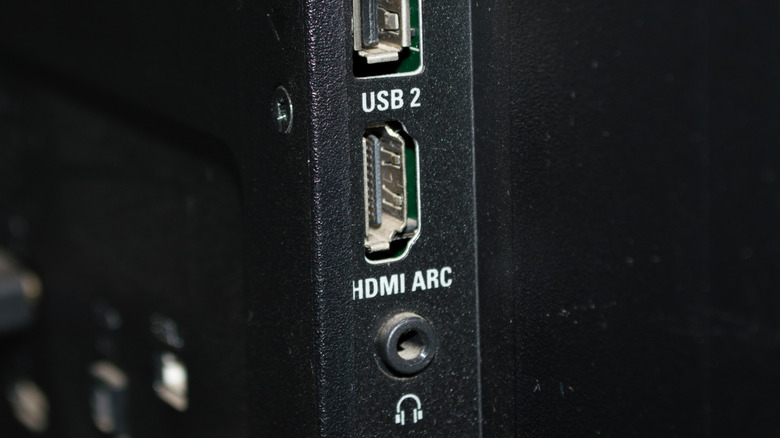
For those wondering does optical cable support dolby atmos on soundbar, the answer is a firm no. To get the "height" channels and the immersive bubble of sound that modern movies offer, you must use an HDMI ARC or eARC connection. This is particularly important now that multi-channel soundbar systems, including 3.1, 5.1, and Dolby Atmos configurations, represented more than 40% of the total market revenue as of May 2026. If you have invested in one of these systems, using an optical cable is like putting budget tires on a Ferrari.
| Feature | Optical (Toslink) | HDMI ARC | HDMI eARC |
|---|---|---|---|
| Max Bandwidth | ~384 kbps | ~1 Mbps | ~37 Mbps |
| Max Audio Channels | 5.1 (Compressed) | 5.1 (Compressed) | 32 (Uncompressed) |
| Dolby Atmos Support | No | Limited (via DD+) | Yes (Full Lossless) |
| Lossless Audio | No | No | Yes |
| Remote Sync (CEC) | No | Yes | Yes |
| Lip-Sync Correction | No | Optional | Mandatory |
When comparing hdmi earc vs toslink for lossless audio formats, HDMI eARC is the only connection that ensures you are hearing the studio-master quality the creators intended.
Functional Benefits: Beyond Just Sound Quality
In our testing at the lab, we have found that the benefits of HDMI extend far beyond just the bitrate. There is a "quality of life" factor that makes HDMI the clear winner for daily use. This primarily comes down to a feature called HDMI-CEC (Consumer Electronics Control).
When you use an HDMI cable to connect your soundbar to your TV's ARC or eARC port, the two devices start talking to each other. This means when you turn on your TV, your soundbar turns on automatically. More importantly, it solves the problem of controlling soundbar volume with tv remote hdmi vs optical. With HDMI, your TV remote controls the soundbar volume directly. If you use an optical cable, you are often stuck using two different remotes or going through a tedious "learning" process to get your TV remote to talk to the soundbar via infrared.
Another critical feature is Lip-Sync Correction. There is nothing more distracting than watching a movie where the actors' voices don't match their lip movements. Because HDMI carries both video and audio data, it can automatically sync the two signals to ensure they are perfectly aligned. This is a mandatory requirement for the HDMI eARC standard, whereas optical connections have no built-in way to communicate timing information back to the TV.
However, it is worth noting one specific area where optical has a technical advantage. Because a Fiber Optic Cable uses light pulses rather than electricity to transmit data, it is completely immune to electromagnetic interference (EMI). If you are running cables near heavy electrical equipment or inside walls with lots of power lines, a Toslink vs HDMI for soundbars comparison might favor optical for its signal stability over long distances. Optical cables can often run up to 30 feet without any signal degradation, whereas standard HDMI cables might start to struggle or require expensive active repeaters.
Use Case Scenarios: When to Use Optical Instead of HDMI
While we generally recommend HDMI, there are specific real-world situations where the best audio connection for 4k tv to soundbar might actually be optical.
The Audiophile with a 4K Atmos System If you own a modern 4K TV and a soundbar that supports DTS:X or Dolby Atmos, you have no choice. You must use HDMI eARC. Using an optical cable in this scenario would mean losing more than 90% of the audio data your system is capable of processing. To ensure the best performance, always look for the eARC label on both your TV and soundbar ports.
The Casual Listener with a 2.1 Soundbar If you are using a simple two-channel soundbar with a separate subwoofer, the difference between hdmi arc vs optical for soundbar connection is much less noticeable. Since a 2.1 system doesn't require the massive bandwidth of spatial audio, the compressed signal of an optical cable will sound perfectly fine for news, sitcoms, and casual music listening.
Owners of Legacy Equipment This is the most common reason we see people choosing optical. Many high-end AV receivers and older TVs from the early 2010s simply do not have HDMI ARC ports. If your TV was made before 2009, it likely doesn't support ARC at all. In this case, S/PDIF (the technical name for the optical connection) is a reliable, "it just works" solution that still provides a significant upgrade over the built-in TV speakers.
Long Distance Cable Runs If your soundbar is mounted on a wall far away from your media cabinet, or if you are running audio to a second room, optical is often more reliable. When you ask when to use optical instead of hdmi for audio, the answer is usually "when the distance exceeds 25 feet." Optical cables are thinner, more flexible, and less prone to the "handshake" issues that can plague long HDMI runs.
Troubleshooting: Getting No Sound from Your Soundbar
Even with the best connection, things can go wrong. If you’ve connected your HDMI or optical cable and aren't hearing anything, it’s usually a settings issue rather than a hardware failure.
First, check your TV’s audio output menu. Many TVs do not automatically switch from "Internal Speakers" to "Optical" or "HDMI ARC." You may need to manually select the output. While you are in that menu, look for the Digital Output Format. If you are using an optical cable, you should generally set this to PCM or Dolby Digital. If you are using HDMI eARC and want the best quality, set it to Auto or Bitstream to allow the soundbar to do the heavy lifting of decoding the audio.
We also occasionally see a "Headphone Mode" bug on certain smart TV platforms, like Roku or Android TV, where the TV thinks a pair of headphones is plugged in and mutes all digital outputs. A quick restart usually clears this.
Finally, if you are using HDMI eARC to get high-resolution audio, ensure you are using an Ultra High Speed HDMI cable. Older, "Standard" HDMI cables may not have the internal wiring required to handle the high-speed data return channel, leading to audio dropouts or a complete lack of sound.
FAQ
Is HDMI audio better than Optical?
Yes, HDMI is technically superior to optical. HDMI has much higher bandwidth, allowing it to carry high-resolution, lossless audio formats and spatial audio like Dolby Atmos. Optical is limited to older, compressed surround sound formats.
Does Optical support Dolby Atmos?
No, optical cables do not have enough bandwidth to transmit Dolby Atmos. Atmos is an object-based format that requires the high-speed data capacity of an HDMI ARC or eARC connection.
Why would I use an Optical cable instead of HDMI?
You should use an optical cable if your TV or soundbar is older and lacks HDMI ARC/eARC ports. It is also a good choice for very long cable runs where HDMI might suffer from signal interference or handshake issues.
Does HDMI ARC replace the need for an Optical cable?
In almost all modern setups, yes. HDMI ARC and eARC provide all the audio capabilities of an optical cable while adding support for higher-quality audio formats and the ability to control your devices with a single remote.
Which connection is best for a home theater soundbar?
HDMI eARC is the best connection for a home theater soundbar. It provides the highest possible audio fidelity, supports all modern surround sound formats, and ensures perfect lip-syncing between your video and audio.