Quick Facts
- Market Trend: Approximately 56% of the gaming audio market consists of integrated gaming headsets, while standalone headphones paired with mics hold a 44% share.
- Pro Insight: Around 34% of professional gamers choose standalone studio headphones over traditional gaming gear for better clarity.
- Performance Metric: Standard stereo headphones offer 87% directional accuracy for locating in-game cues, outperforming virtual 7.1 surround sound which only reaches 71%.
- Direct Answer: Choosing between a gaming headset vs headphones depends on whether you value plug-and-play convenience or modular audio fidelity.
- Convenience Factor: Gaming headsets provide low-latency wireless and integrated software for instant EQ adjustments.
- Fidelity Factor: Separate setups allow for high-end components like an Audio Interface or XLR Connectivity for studio-grade recording.
- Durability: Separate components avoid the single point of failure common in headsets where a broken mic renders the whole unit compromised.
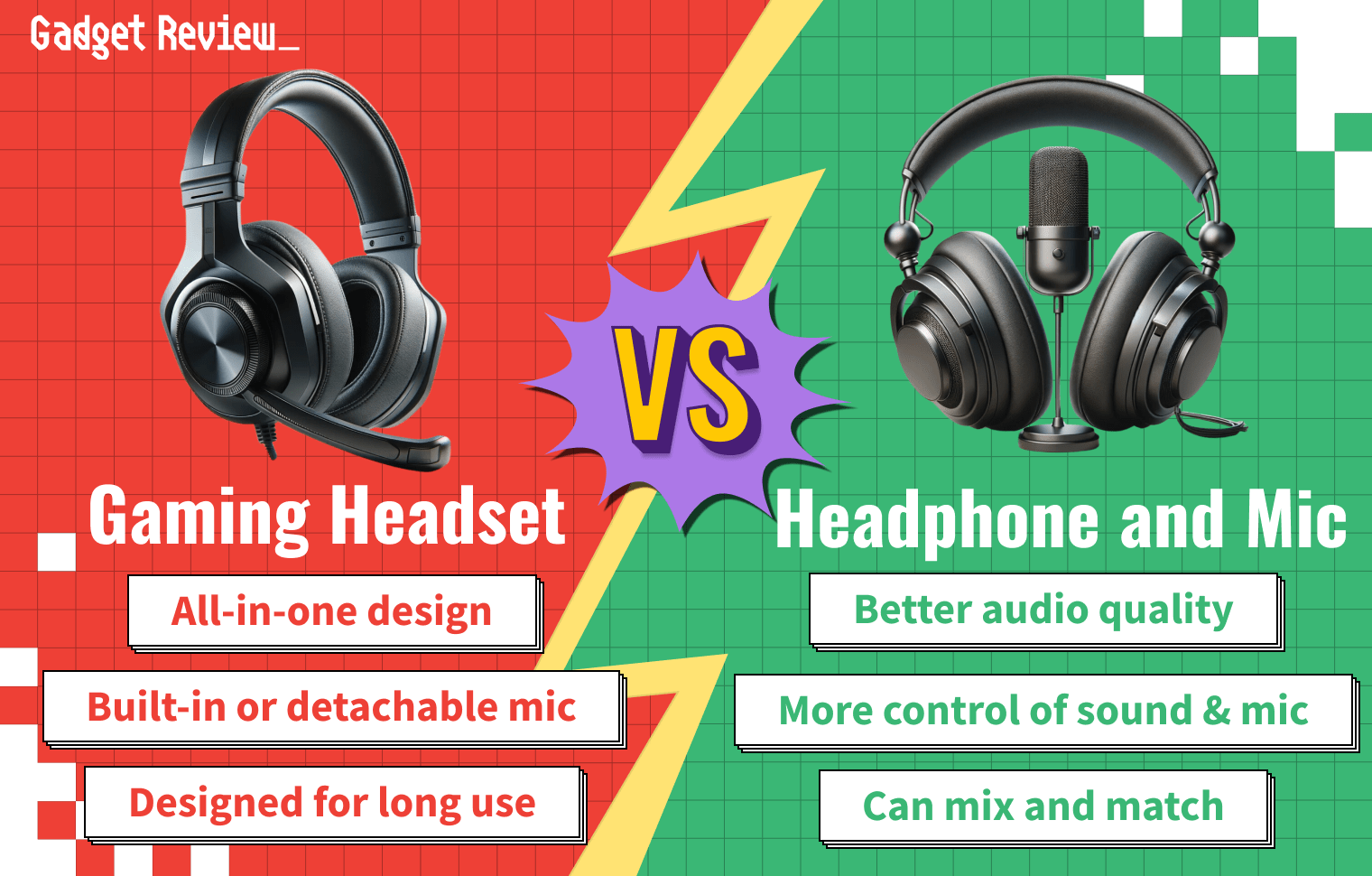
Choosing between a gaming headset vs headphones depends on your priorities for convenience and audio fidelity. Gaming headsets offer a convenient all-in-one solution with built-in features like spatial audio, mic monitoring, and plug-and-play connectivity. In contrast, pairing studio headphones with a separate microphone typically provides superior sound clarity and more precise control over the audio mix, which is ideal for streaming and content creation.
The All-in-One Advantage: Why Gaming Headsets Win on Convenience
In the world of fast-paced competitive play, friction is the enemy. This is where the modern gaming headset shines. Most gamers don't want to spend thirty minutes configuring a mixer before a session; they want to plug a USB dongle in and hear footsteps immediately. Modern flagships like the Razer BlackShark V3 Pro have pushed the boundaries of Low-Latency Wireless technology, often delivering 10ms to 30ms response times that are indistinguishable from a wired connection.
One of the biggest draws is the integrated ecosystem. Brands like SteelSeries and Razer offer sophisticated software like SteelSeries Sonar, which allows you to toggle specific EQ profiles for games like Valorant or Apex Legends with a single click. You also get quality-of-life features that are hard to replicate with separate parts, such as Mic Monitoring (hearing your own voice so you don't shout) and the classic Flip-to-Mute mechanic.
When we look at spatial audio performance in gaming headsets vs studio headphones, headsets often lean on virtual processing to create a 360-degree sound field. While this can feel immersive for cinematic games, it is important to remember that this is software-driven. However, for a console gamer sitting on a couch, the ability to have a single device that handles both game audio and chat via a wireless signal is a massive lifestyle win. Add in the ridiculous battery life of units like the HyperX Cloud Alpha—which boasts over 300 hours—and the convenience argument becomes almost unbeatable for the casual player. Comfort is also a primary focus here, with over-ear memory foam padding designed to distribute weight over long sessions, even if the added electronics make them slightly heavier than a basic pair of cans.
The Audiophile Route: Why Separate Headphones and Mics Rule for Performance
If you move into the world of professional streaming or high-level competitive play, you start to see a shift. This is the audiophile route, where the focus moves from "features" to "fidelity." The core of this setup is often a pair of open-back studio headphones. Unlike the closed-back design of most headsets, open-back headphones provide a wider Soundstage, making it feel like the sound is happening in the room around you rather than inside your skull.
Many enthusiasts are now using studio headphones for gaming with a modmic to get the best of both worlds. A Modmic is a small, high-quality microphone that magnetically attaches to the side of any pair of headphones. This allows you to use legendary gear like the Sennheiser HD600 or the Audeze Maxwell while still having a boom mic near your mouth. For those who want the absolute best streaming audio setup for gamers, a dedicated desktop microphone is the gold standard.
Moving to a standalone mic vs gaming headset setup often introduces more professional hardware into your signal chain. You might use a Condenser Capsule microphone on a Boom Arm to get that rich, broadcast-quality voice. This usually requires an Audio Interface or a DAC and Amp to drive the headphones. While it sounds complicated, the results are undeniable. You get a much wider Frequency Response, meaning your teammates hear the full depth of your voice rather than a compressed, nasally version of it.
Comparative Analysis: Soundstage, Latency, and Durability
The technical gap between these two worlds is most apparent when we look at how sound is actually processed. Most gaming headsets are tuned with "V-shaped" sound profiles—meaning the bass and treble are boosted. This makes explosions sound thunderous, but it can often muddy the subtle audio cues like footsteps or reloading sounds. Studio headphones tend to have a more neutral frequency response, which allows you to hear the game exactly as the sound designers intended.
There is also the critical issue of the "Single Point of Failure." If the internal wiring of a gaming headset mic shorts out, the entire $200 device is effectively broken for multiplayer use. With a separate setup, if your mic breaks, you just replace the mic. If your headphone cable snaps, you just swap the cable. This modularity significantly increases the lifespan of your investment.
To visualize the performance gap identified in recent testing, consider the following data on directional accuracy:
| Feature | Integrated Gaming Headset | Separate Headphone & Mic |
|---|---|---|
| Audio Setup Complexity | Low (Plug-and-Play) | Moderate (Requires Routing) |
| Directional Accuracy | 71% (Virtual 7.1) | 87% (Standard Stereo) |
| Voice Quality | Variable (Compressed) | High (Broadcast Quality) |
| Connectivity | USB / Wireless | XLR / 6.35mm / USB |
| Best Use Case | Console / Casual Gaming | Streaming / Competitive Play |
As shown, the virtual surround sound marketed by many brands actually performs worse in locating sounds than a high-quality stereo image. This is because virtual 7.1 often introduces phase distortion, which can confuse your brain's ability to pinpoint the source of a sound.
When considering the durability of integrated headset mics vs external desktop microphones, the external mic wins every time. A dedicated microphone stays stationary on a desk or arm, whereas a headset mic is constantly being flipped, bent, and exposed to moisture from your breath. Over two or three years, the physical wear on a headset is much more pronounced.
Investment Strategy: Total Cost of Ownership
When beginners look at the cost difference between gaming headsets and headphone mic combos, they often assume the headset is cheaper. This isn't always true. You can pick up a stellar pair of entry-level studio headphones and a USB condenser mic for roughly $100 total. A "premium" gaming headset with similar audio quality often costs $150 to $200 because you are paying a "Gamer Tax" for RGB lighting and brand licensing.
Is it worth buying a separate mic and headphones for beginners? If you only plan to play a few hours of Call of Duty a week, probably not. The simplicity of a headset is worth the price. However, if you have any interest in content creation, podcasting, or even just having the best possible music-listening experience while you work, the separate route offers significantly better long-term value.
You should also consider the Signal-to-Noise Ratio. Integrated headsets, especially wireless ones, often have a faint "hiss" in the background due to the electronics being crammed so close to the drivers. A separate setup with a dedicated DAC (Digital-to-Analog Converter) eliminates this floor noise, providing a pitch-black background that makes every leaf crunch in a stealth game stand out.
FAQ
Is a gaming headset better than regular headphones for gaming?
A gaming headset is better only in terms of convenience and specific gaming features like chat-mix dials and wireless connectivity. In terms of pure audio quality and directional accuracy, regular studio headphones usually outperform gaming-branded gear.
Can I use studio headphones for gaming?
Yes, and many professionals do. You will likely need a separate microphone, but the sound quality and comfort are often superior to gaming-specific models. Just ensure your PC or controller can provide enough power to drive them if they have high impedance.
Why do some gamers prefer headphones over headsets?
Gamers prefer headphones because they offer a more natural soundstage and better frequency response. This makes it easier to track enemies by sound alone. Additionally, they avoid the single point of failure where a broken mic ruins the entire device.
Is it cheaper to buy a headset or headphones and a separate microphone?
Initially, a budget headset is cheaper. However, a mid-range headphone and mic combo often provides better value over time because the components are more durable and can be upgraded individually as your needs change.
Is a dedicated microphone better than a built-in headset mic?
A dedicated microphone is significantly better. It uses a larger Condenser Capsule and offers better Pickup Patterns, which helps reject keyboard noise and provides a much clearer, more professional vocal tone.
Final Verdict: Which Setup Fits Your Playstyle?
Ultimately, the choice comes down to your "battlestation" philosophy. Are you a minimalist who wants a clean desk and a one-button setup? Or are you a power user who wants to tweak every decibel and ensure your stream sounds like a professional radio broadcast?
Choose a Gaming Headset if:
- You play primarily on consoles (PS5, Xbox, Switch).
- You hate cable clutter and want Low-Latency Wireless.
- You need features like Flip-to-Mute and on-ear volume wheels.
- You want a simple, all-in-one software suite to manage your audio.
Choose Separate Headphones and a Mic if:
- You are a competitive FPS player who needs the 87% directional accuracy of high-end stereo.
- You are a streamer or content creator who needs professional vocal clarity.
- You want a modular setup that won't become e-waste if one part breaks.
- You value music-listening quality as much as gaming performance.
Both paths have evolved tremendously. We are seeing gaming headsets adopt audiophile drivers, and we are seeing audiophile brands release more "gaming-friendly" accessories. No matter which you choose, focus on comfort first—because the best-sounding setup in the world isn't worth much if it gives you a headache after an hour of raiding.