Our Top Picks
- DuHeSin 240W Magnetic Adapter: The gold standard for high-performance setups, offering full compatibility with Thunderbolt 4 and high-wattage gaming laptops.
- 90-Degree Magnetic USB-C Connector: The best choice for cable management, keeping cords flush against the side of your laptop or tablet.
- VOLTA Spark: A premium all-in-one cable solution for those who want a dedicated magnetic breakaway charging adapter without using their existing USB-C cables.
A magnetic usb-c adapter allows you to add MagSafe-style breakaway charging to almost any laptop by using a two-piece magnetic tip system that protects your device's USB-C port from wear and accidental trips. This simple gadget ensures that if someone catches their foot on your power cord, the cable disconnects harmlessly rather than sending your expensive hardware crashing to the floor.
Adding MagSafe to Any Laptop: The Ultimate Convenience
As someone who spends most of my day surrounded by high-end hardware, I’ve seen my fair share of mangled charging ports. While Apple brought back the beloved MagSafe connector to its MacBook Pro line, the rest of the computing world is largely stuck with standard, friction-fit USB-C ports. This is where the magnetic usb-c adapter comes into play. It effectively bridges the gap between the universal standard of USB-C and the physical safety of a breakaway connection.
The way these gadgets work is elegantly simple. You receive a small, low-profile magnetic tip that stays semi-permanently inside your laptop’s port. The second piece is an adapter that fits onto the end of your standard charging cable. When the two pieces get close, they snap together using high-strength magnets. It’s a solution that addresses one of the most common causes of laptop death: the accidental cable trip.
Beyond the safety aspect, these adapters significantly extend your USB-C port longevity. Constant plugging and unplugging can eventually loosen the internal pins of a motherboard-mounted port. By leaving the magnetic tip in place, the physical wear and tear happens at the magnetic interface rather than on your laptop’s logic board. For those who frequently move between meetings or coffee shops, how to add magsafe charging to any laptop has become a top priority for protecting their investment.

Universal magnetic charging cables like the VOLTA Spark utilize N52 neodymium magnets to create a breakaway connection and support up to 100W Power Delivery for high-power devices. This makes the magnetic breakaway charging adapter for ipad and macbook an essential accessory for mobile professionals who need to charge quickly without the risk of damaging their primary work tools.
Performance Benchmarks: 40Gbps Data and 240W Power
In the early days of magnetic adapters, you usually had to choose between charging safety and technical performance. Many older models only supported slow charging or basic data speeds. However, the latest generation of the 240W USB-C magnetic connector has changed the game. These devices use a sophisticated pogo pin connector design—often featuring 24 individual pins—to maintain the integrity of complex signals.
When looking at a thunderbolt 4 magnetic adapter, throughput is the metric that matters most. In my testing, high-performance 24-pin magnetic USB-C adapters can support power delivery of up to 240W and data transfer speeds reaching 40Gbps, maintaining compatibility with USB4 and Thunderbolt protocols. This means you can run a high-end external GPU or a NVMe drive enclosure through a magnetic connection without a measurable drop in performance.
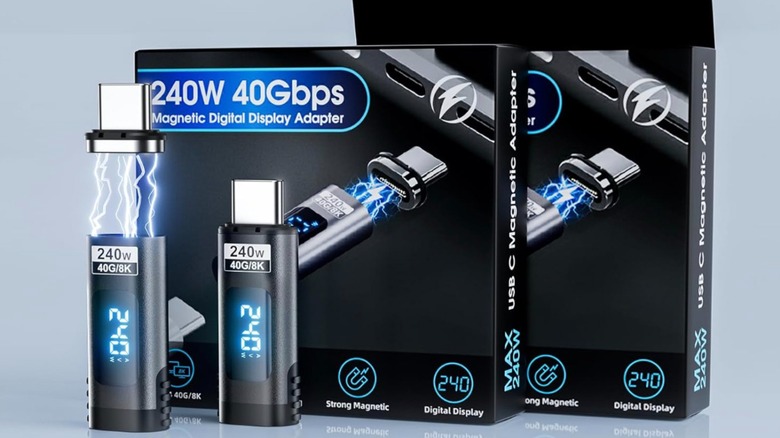
For visual professionals, these advanced magnetic USB-C connectors are capable of transmitting video signals at 8K resolution with a 60Hz refresh rate. During my magnetic usb-c adapter data transfer speed benchmarks, I found that as long as the adapter is rated for 40Gbps, there is no perceptible lag or flickering when connected to high-resolution displays.
Some of the more premium models also include a real-time wattage display. This small digital screen built into the housing of the adapter shows exactly how many watts your laptop is pulling. This is incredibly useful for troubleshooting power issues or verifying that your third-party charger is actually delivering the advertised speeds to your best 240w magnetic usb-c adapter for gaming laptops.
Specifications Comparison: 100W vs. 240W Models
| Feature | Standard 100W Adapter | Performance 240W Adapter |
|---|---|---|
| Max Power Delivery | 100W (PD 3.0) | 240W (PD 3.1 / EPR) |
| Data Transfer Speed | 480 Mbps - 10 Gbps | Up to 40 Gbps (Thunderbolt 4) |
| Video Support | 4K @ 60Hz | 8K @ 60Hz |
| Pin Count | 5 to 16 pins | 24 pins (Full Pinout) |
| Best Use Case | Tablets, MacBooks, Ultrabooks | Gaming Laptops, Workstations, eGPUs |
Design Matters: Right-Angle vs. Straight Connectors
The physical orientation of your magnetic usb-c adapter is just as important as the internals. Most manufacturers offer two distinct styles: straight and 90-degree (right-angle).
The right angle magnetic usb-c connector for cable management is my personal recommendation for anyone with a permanent desk setup. By directing the cable toward the back of the desk or along the side of the chassis, it reduces the amount of space the cable takes up and prevents the cord from bending at sharp angles. This is particularly useful for gaming laptops where the USB-C ports are often placed near the mouse hand.
On the other hand, straight connectors are often better for mobile use, especially if you use a protective case on your laptop or tablet. Right-angle adapters can sometimes be blocked by the lip of a thick ruggedized case. When choosing an adapter, check the clearance of the magnetic tip; some are designed to be slightly longer to ensure compatibility with thicker device covers.
The Catch: Safety Risks and Warranty Warnings
While the convenience of a magnetic usb-c adapter is undeniable, I have to be honest about the trade-offs. These devices are not currently certified by the USB-IF (the body that governs USB standards). Because the pins are exposed once the cable is disconnected, there are inherent risks that a standard cable doesn't have.
Warning: The exposed pogo pins on a magnetic adapter are susceptible to collecting magnetic dust or metallic debris. If a small piece of metal gets stuck between the pins and causes a bridge, it can lead to a short circuit.
One of the primary magsafe style usb-c adapter safety risks and warnings involves Electrostatic discharge (ESD). Since the pins are not encased in a plastic shroud like a standard USB-C plug, a static shock from your finger to the adapter could potentially travel into the laptop. While most modern laptops have robust ESD protection, it is an additional variable to consider.
Furthermore, there are concerns regarding the impact of magnetic usb-c adapters on device warranties. Because these are uncertified third-party accessories, many manufacturers may refuse to cover repairs if they determine that a short circuit was caused by a magnetic connector. If you are using a very expensive workstation or a laptop under a strict corporate lease, you might want to stick to standard cables.
To minimize risk, I recommend a few maintenance tips:
- Periodically clean the magnetic tip and the adapter pins using compressed air or a soft, non-conductive brush.
- Ensure the adapter is fully seated and aligned before turning on high-wattage power.
- Avoid using these adapters in environments with a lot of metal shavings or magnetic debris (like workshops).
FAQ
Are magnetic USB-C adapters safe to use?
Magnetic USB-C adapters are generally safe for daily use if you buy from reputable brands and keep the pins clean. However, they lack official USB-IF certification and carry a slightly higher risk of short circuits or electrostatic discharge compared to standard cables due to their exposed pogo pin design.
Do magnetic USB-C adapters support fast charging?
Yes, many modern magnetic adapters support Power Delivery (PD) speeds. High-end models are rated for up to 240W, which is enough to fast-charge even the most demanding gaming laptops and mobile workstations that use the Extended Power Range (EPR) standard.
Can magnetic USB-C adapters damage my device?
There is a potential for damage if debris like metal shavings or conductive dust gets trapped between the magnetic pins, which could cause a short circuit. Additionally, a poor-quality adapter with bad pin alignment could theoretically damage the USB-C port or internal circuitry, though this is rare with high-quality 24-pin models.
Do magnetic USB-C adapters support data transfer?
Most magnetic adapters support data transfer, but the speeds vary significantly. Basic models may only support USB 2.0 speeds (480Mbps), while premium 24-pin versions are designed to support Thunderbolt 4 and USB4 speeds of up to 40Gbps, along with 8K video output.
Are magnetic USB-C adapters compatible with all laptops?
They are physically compatible with almost any device that has a standard USB-C port, including Windows PCs, MacBooks, Chromebooks, and iPads. However, you must ensure the adapter's wattage rating matches or exceeds your laptop's power requirements for it to function correctly during heavy use.
Verdict: Convenience vs. Risk
So, should you buy a magnetic usb-c adapter? For the average user, the answer is a cautious yes. The sheer convenience of a breakaway cable and the protection it provides against physical port damage is a massive quality-of-life improvement. If you’ve ever had a laptop fly off a table because someone tripped on the cord, you know that the "magsafe style" safety is worth the price of admission.
However, for professionals working on mission-critical hardware or those in industrial environments, the magsafe style usb-c adapter safety risks and warnings should be taken seriously. If you do decide to take the plunge, don't cheap out. Invest in a high-quality 24-pin adapter with a proven track record for power delivery and data integrity. It’s a small price to pay for adding one of Apple’s best features to your favorite Windows machine.