Our Top Picks
- Best For: College students, high schoolers, and anyone needing a reliable machine for light productivity and web-based workflows.
- Top Performance: The A18 Pro chip delivers surprising speed, beating the original M1 in single-core tasks by 47%.
- Best Value: At $599—or $499 with an education discount—it is officially the most accessible entry point into the Apple ecosystem.
- Key Trade-off: You will have to live with a non-backlit keyboard, slower USB 2.0 speeds on one port, and a display limited to the sRGB color space.
The MacBook Neo review confirms this is the best budget MacBook for students, offering a premium 13-inch aluminum design and macOS power for just $599, though it makes strategic cuts in port speed and display gamut. If you are looking for the best budget MacBook for students in 2026, this machine balances silicon efficiency with an aggressive price point that challenges both high-end Chromebooks and entry-level Windows laptops.

The Silicon Shift: A18 Pro Performance on macOS
For years, we speculated when Apple would finally bridge the gap between its world-class mobile silicon and its desktop operating system. With the launch of the MacBook Neo in early 2026, that bridge has been built. The heart of this machine is the A18 Pro chip featuring a 6-core CPU consisting of two performance cores and four efficiency cores. While this silicon started its life in the iPhone, seeing the A18 Pro chip performance macOS capability in a laptop chassis is a revelation for the entry-level segment.
We put the Neo through its paces to see if an iPhone processor could truly handle a desktop-class workload. In our Geekbench 6 testing, the A18 Pro in the MacBook Neo achieved a single-core score of approximately 3,461, which is roughly 47% faster than the original M1 chip. This means for everyday tasks like launching apps, snappy web browsing, and document editing, the Neo actually feels faster than the 2020 MacBook Air.
However, the MacBook Neo 8GB RAM multitasking performance is where you will feel the ceiling. While macOS is excellent at memory pressure management, trying to run a heavy video render while having thirty Chrome tabs open will cause some swap-to-disk lag. This machine is built for the student who lives in Google Workspace, Canvas, and Microsoft Teams, not the professional video editor.
The fanless thermal performance and fanless design are the real stars here. Because the A18 Pro is so energy efficient, the MacBook Neo remains completely silent regardless of the workload. Even under sustained stress, the aluminum unibody dissipates heat effectively without the "lap-burn" sensation common in older budget laptops. Furthermore, the 16-core Neural Engine is capable of 35 trillion operations per second (TOPS), making it a surprisingly capable machine for on-device AI processing and productivity essentials like live captioning and background blur in video calls.
| Feature | MacBook Neo Specification |
|---|---|
| Processor | A18 Pro (6-core CPU, 6-core GPU) |
| Neural Engine | 16-core (35 TOPS) |
| Memory | 8GB Unified Memory (60 GB/s) |
| Storage | 128GB / 256GB SSD |
| Thermal | Fanless Passive Cooling |
| Display | 13.3-inch Liquid Retina (500 nits) |
Design and Display: Premium Looks, Budget Realities
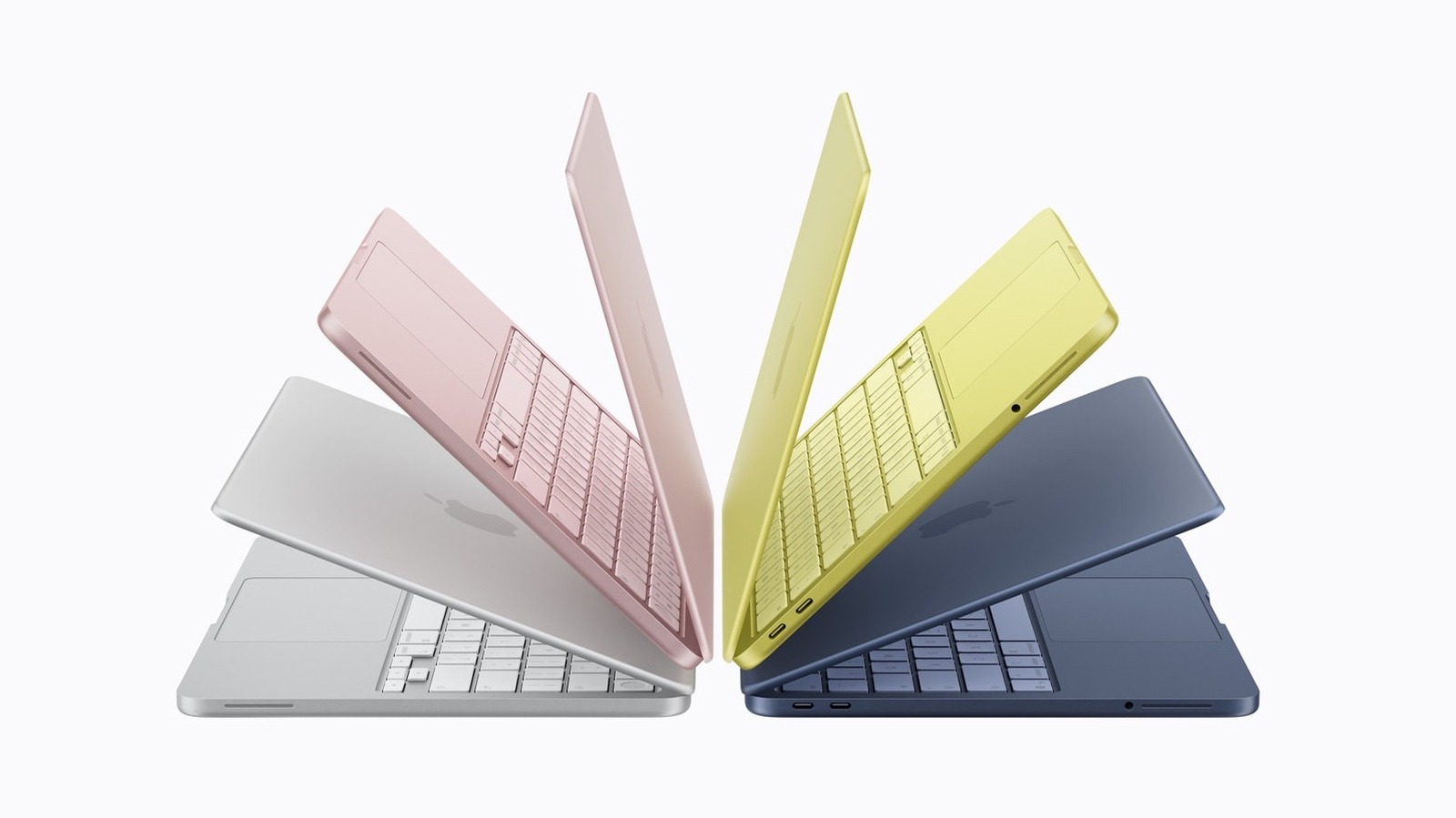
When you first hold the MacBook Neo, it doesn't feel like a "cheap" laptop. It maintains the classic aluminum unibody construction that has defined Apple's design language for a decade. It is thin, light, and fits perfectly into a standard backpack, reinforcing its position as the best budget MacBook for students.
The 13-inch Liquid Retina display is bright at 500 nits, which is plenty for a sunlit classroom or a coffee shop window seat. However, to hit that price of $599, Apple made a notable cut: the display covers the sRGB color gamut rather than the wider DCI-P3 gamut found on the MacBook Air. For writing papers or watching Netflix, you won't notice the difference. But if you are a design student needing color-accurate photo editing, this might be a dealbreaker.
The interface also sees some cost-saving measures. While you get the excellent Magic Keyboard with Touch ID for secure logins, the base model lacks a backlight. This is a significant point to consider for college students 2026 who often work in dim dorm rooms or late-night library sessions. You still get the best-in-class Force Touch trackpad, which remains miles ahead of the plastic trackpads found on similarly priced Windows machines.
The Compromise List: Ports and Connectivity Trade-offs
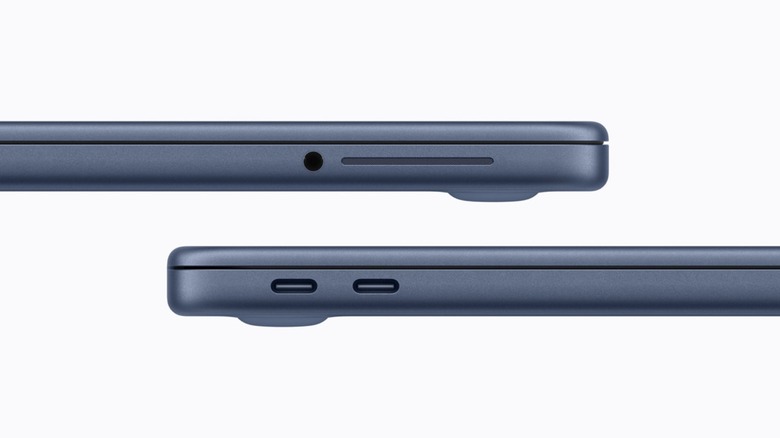
This is where my technical assessment has to get honest. To achieve this price point, Apple has significantly curtailed the I/O capabilities. Looking at the MacBook Neo ports and connectivity trade-offs, we find two USB-C ports on the left side, but they are not created equal.
One port supports USB 3 speeds (10Gbps), which is fine for modern external SSDs. The second port, however, is restricted to USB 2 speeds (480Mbps). In 2026, seeing a USB 2.0 speed port on a laptop is frustrating, but it serves its purpose as a dedicated charging port or for connecting a mouse or keyboard. You also lose Thunderbolt support entirely, which means no high-speed RAID arrays or external GPU support—though the target audience for this laptop likely doesn't own those peripherals.
External display support is also limited. The MacBook Neo can drive a single external monitor at up to 4K resolution at 60Hz. If you were hoping to build a multi-monitor workstation on a budget, you will need to look toward the MacBook Air or Pro lines.
| Feature | Pros | Cons |
|---|---|---|
| Price | Unbeatable $599 entry point | 128GB base storage is tight |
| Portability | Fanless and extremely light | Non-backlit keyboard on base model |
| Performance | A18 Pro is 47% faster than M1 | No Thunderbolt or USB 4 support |
| Display | 500 nits brightness | sRGB only (no wide color gamut) |
| Sustainability | High repairability score (6/10) | Single external display support |
Real-World Utility: Battery Life and Repairability
In our standardized testing, the MacBook Neo battery life real-world testing results were impressive. While Apple advertises up to 16 hours, we saw a consistent 13.5 hours of heavy web browsing and video playback at 50% brightness. For a student, this means you can leave the charger at home for a full day of classes and still have enough juice for a study session in the evening.
One surprising win for the MacBook Neo is its repairability. Influenced by shifting EU regulations, Apple has moved toward a more modular internal design. With an iFixit repairability score of 6/10, the Neo features modular ports and a battery that is retained by screws rather than aggressive adhesive. This gives the device a longer potential lifespan, allowing users to replace worn-out batteries or broken ports without replacing the entire logic board.
The Apple ecosystem accessibility remains the strongest "feature" here. Having iMessage, FaceTime, AirDrop, and iCloud sync on a $599 device makes the mobile-to-desktop transition seamless for iPhone users. It provides that premium Apple experience without the $1,000+ investment.
MacBook Neo vs. The Competition
When comparing the MacBook Neo vs budget Windows laptops, the choice usually comes down to build quality versus flexibility. A $600 Windows laptop, like one powered by an Intel Core Ultra 5, might offer more ports and a backlit keyboard, but it often comes in a chassis that feels hollow and includes a fan that whirs to life during basic tasks.
The MacBook Neo vs iPad with Magic Keyboard debate is also relevant. While an iPad is more portable, the MacBook Neo provides a full desktop browser and a real file system. For actual productivity, macOS wins every time. Furthermore, when you look at the MacBook Neo vs Chromebook for high school students, the Neo offers significantly more local processing power and the ability to run "real" apps like the full version of Microsoft Office or Adobe Lightroom.
The A18 Pro chip performance on macOS ensures that even though this is a "budget" chip, it doesn't feel like a "budget" experience. It avoids the lag often found in low-end Windows machines after a year of use.
FAQ
Is the MacBook Neo worth buying?
Yes, for students and general users who prioritize portability, battery life, and the macOS ecosystem over professional-grade power or high-end display specs. At $599, it offers the best build quality in its price bracket.
What are the main features of the MacBook Neo?
The standout features include the A18 Pro chip, a 13-inch Liquid Retina display, a fanless and silent design, Touch ID, and a 16-hour rated battery life. It also benefits from a more repairable internal structure compared to older MacBooks.
How does the MacBook Neo compare to the MacBook Pro?
The MacBook Pro is a workstation designed for intensive tasks like 8K video editing and 3D rendering, featuring M-series Pro/Max chips, ProMotion displays, and active cooling. The MacBook Neo is an entry-level productivity machine meant for web-based work and education.
What is the battery life of the MacBook Neo?
The MacBook Neo is rated for up to 16 hours of use. In real-world testing, users can expect roughly 13 to 14 hours of continuous productivity, which easily covers a full school or workday.
Does the MacBook Neo have a cooling fan?
No, the MacBook Neo utilizes a fanless thermal management system. It relies on the extreme energy efficiency of the A18 Pro chip and its aluminum chassis to dissipate heat silently.
Final Verdict: Is it the Best Budget Laptop for Students?
The MacBook Neo for college students 2026 represents a strategic pivot for Apple. By repurposing iPhone silicon, they have created a machine that is both affordable and remarkably capable for the entry-level segment. It isn't perfect—the lack of a backlit keyboard and the inclusion of a USB 2.0 port feel like "forced" compromises to protect the sales of the more expensive MacBook Air.
However, the "Intel Support Cliff" is a real concern for budget buyers looking at older used Macs. As Apple continues to move macOS toward Silicon-exclusive features, buying a new MacBook Neo is a much smarter long-term investment than buying a five-year-old Intel MacBook Pro.
If your daily life involves research papers, streaming, and heavy web usage, the MacBook Neo review concludes that this is the best budget MacBook for students available today. It delivers the essential Mac experience—stable, fast, and beautifully built—at a price that finally competes with the rest of the market. For everyone else needing more than 8GB of RAM or professional color accuracy, the MacBook Air remains the better step up. But for the student on a budget, the Neo is the new gold standard.