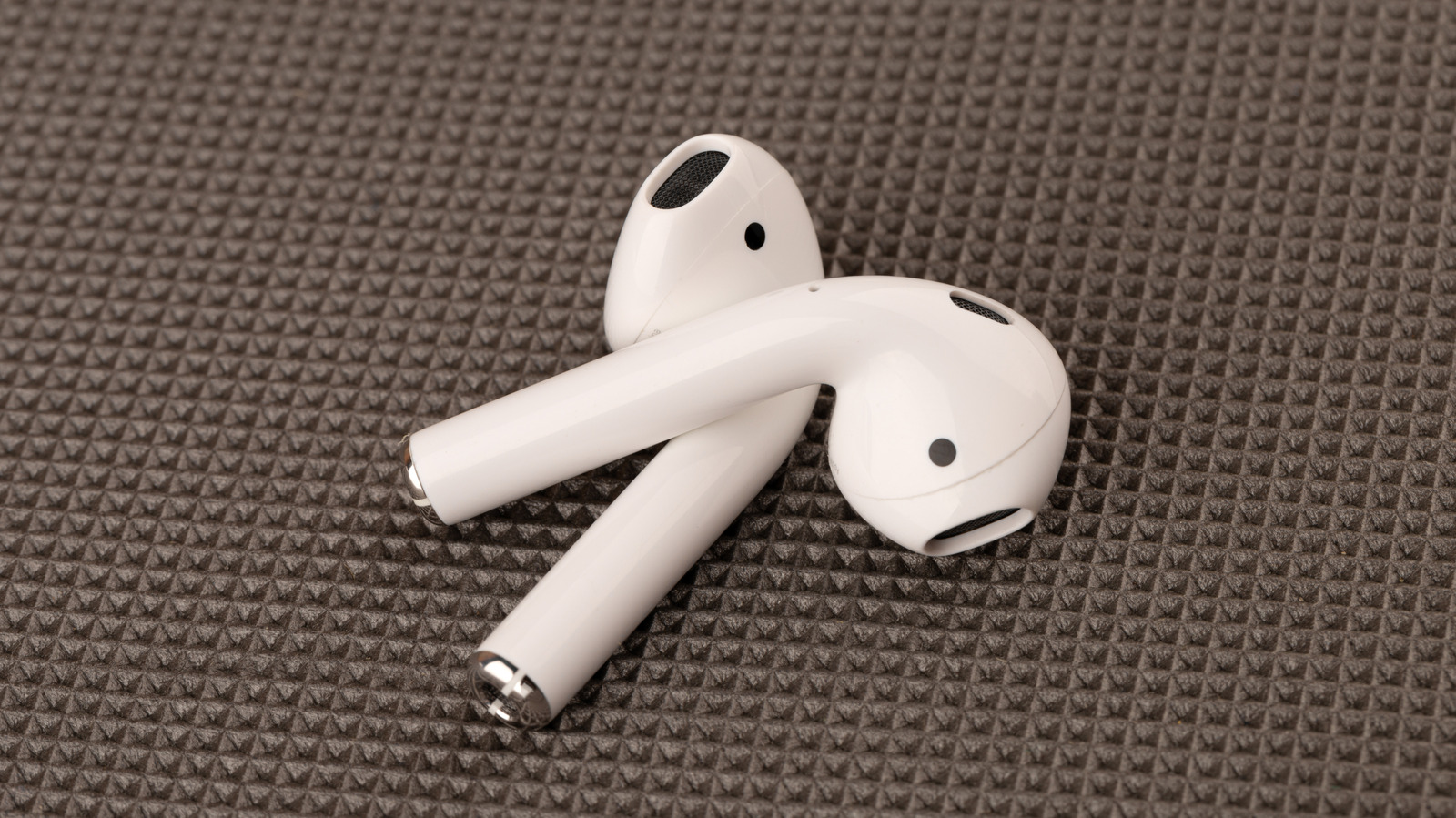
Quick Facts
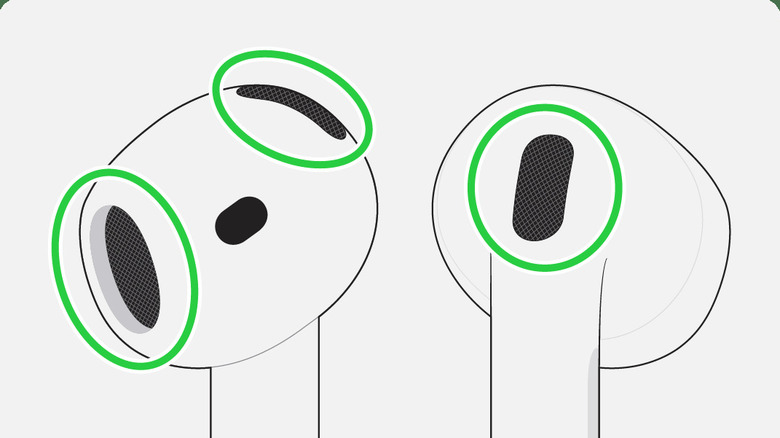
- The Secret: Those black meshes are airflow vents, not secondary speakers.
- Bass Booster: Vents reduce air resistance, allowing the driver to produce stronger low-frequency resonance.
- Material Science: Most vents use ePTFE (expanded Polytetrafluoroethylene) for acoustic transparency.
- Cleaning Gold Standard: Apple recommends Micellar water with PEG-6 Caprylic/Capric Glycerides.
- The Risk: Clogged vents are the #1 cause of failing Active Noise Cancellation (ANC).
AirPods mesh vents serve as essential passageways for airflow within the internal acoustic chamber. They allow the drivers to move with precision, which is necessary for delivering clear high frequencies and deep, resonant bass. Beyond sound tuning, these vents equalize atmospheric pressure to ensure wearing comfort and enhance the performance of features like Active Noise Cancellation and Transparency mode.
Have you ever wondered what those tiny black cutouts on your earbuds are for? They aren't speakers—they are high-tech AirPods mesh vents designed for acoustic chamber airflow optimization. These vents allow for pressure equalization and precise diaphragm movement, which are critical for delivering deep bass and clear audio. If these vents get clogged, your sound quality and ANC performance will plummet. In this guide, we dive into the hardware secrets of AirPods vents and the safest ways to maintain them for peak performance.
The Anatomy of the AirPods Acoustic Chamber
When you hold a pair of AirPods, the design seems seamless, almost like a piece of polished jewelry. However, the purpose of AirPods black mesh vents is purely functional and deeply rooted in acoustic engineering. These aren't just decorative accents; they are the lungs of your earbuds. Inside that tiny plastic earbud housing is a complex world of air displacement and pressure management.
The internal layout of an AirPod is a masterpiece of miniaturization. You have the battery, the H2 or H1 chip, and the driver (the speaker). But sound isn't just about the speaker vibrating; it is about how that speaker moves air. Without AirPods acoustic chamber airflow, the speaker would be trying to move in a vacuum or against high-pressure resistance. This would make the sound thin, tinny, and distorted.
Most of these vents are covered with a specialized ePTFE (expanded Polytetrafluoroethylene) membrane. This material is a favorite in the world of high-end audio and industrial hardware because it is acoustically transparent but physically protective. It allows air molecules to pass through while keeping out sweat, water, and earwax. According to Apple's hardware team, the AirPods Pro 2 features a simplified rear venting system designed to optimize airflow for the driver, which enables greater diaphragm excursion and more precise bass performance.
Physics of Sound: How Vents Improve Bass Response
To understand how AirPods vents improve bass response, we have to look at how sound waves are actually made. To produce a low-frequency sound—that deep "thump" in your favorite track—the diaphragm of the earbud speaker must move a significant amount of air. This is called diaphragm movement. If the earbud housing were completely sealed, the air trapped inside would act like a spring, pushing back against the driver and preventing it from moving fully.
Acoustic vents in AirPods allow air to move in and out of the internal acoustic chamber to equalize pressure, preventing air resistance that would otherwise restrict the speaker's ability to vibrate and produce low-frequency sound. This design ensures that the low-frequency resonance is powerful and controlled rather than muffled.
Furthermore, Apple's hardware design for AirPods includes mesh vents to maintain a consistent bass response by tuning the frequency response and ensuring the internal speaker can operate effectively within the confined space of the earbud housing. Without these AirPods pressure relief vents, the "thump" you expect would turn into a shallow "click." The vents essentially manage the air pressure behind the driver so it can swing freely, creating a wider soundstage and reducing signal distortion.
The Cleaning Secret: Restoring Audio Fidelity
If you have noticed your music sounding a bit flat lately, the culprit is likely a buildup of debris. When earwax or dust clogs those tiny holes, you lose that vital airflow. Learning how to clean AirPods mesh with micellar water is the "pro secret" that many users miss. While many reach for 70% isopropyl alcohol, that can actually damage the delicate adhesives or the ePTFE membrane if used excessively.
Instead, restoring AirPods bass quality through vent maintenance requires a more surgical approach. Apple specifically recommends using micellar water that contains PEG-6 Caprylic/Capric Glycerides. This specific chemical compound is excellent at breaking down the fatty acids in earwax without being as harsh as pure alcohol.
The Step-by-Step Restoration Process
- Dry Brushing: Use a clean, dry, soft-bristled toothbrush to gently sweep away loose debris from the AirPods mesh vents. Do not press hard, as you don't want to push the wax deeper into the acoustic chamber.
- The Micellar Dip: Put a tiny amount of the specific micellar water on the toothbrush. You don't want it dripping; it should just be damp.
- The 15-Second Scrub: Gently brush the black mesh in a circular motion for about 15 seconds. The PEG-6 will dissolve the wax buildup that a dry brush can't reach.
- Blotting: Use a lint-free cloth or a high-quality paper towel to blot the mesh. You should see some of the dissolved wax transfer to the cloth.
- The Drying Phase: This is the most important part. Let your AirPods sit out for at least two hours before putting them back in the charging case or your ears.
| Aspect | Official Apple Method | Practical Pro Method |
|---|---|---|
| Solvent | Micellar water (PEG-6) | Dry brush + Fun-Tak |
| Tool | Soft-bristled toothbrush | Anti-static brush or toothpick |
| Risks | Liquid ingress if over-saturated | Pushing debris deeper |
| Best for | Removing oily buildup and wax | Removing dry skin flakes and dust |
Troubleshooting: Clogged Vents and ANC Failure
Many users don't realize that cleaning AirPods black mesh is about more than just music; it is about safety and functionality. AirPods use external microphones hidden behind these vents to listen to the world around you. This is how Transparency mode works. If the mesh is blocked, the microphones receive a muffled version of the world, leading to a "underwater" feeling or high-pitched whistling sounds.
Similarly, cleaning AirPods mesh to fix muffled sound is often the solution for failing Active Noise Cancellation. ANC relies on a perfect balance of internal and external pressure. If the vent is blocked, the internal microphone cannot accurately measure the air pressure inside your ear canal, causing the ANC algorithm to overcompensate or fail entirely.
If the micellar water method doesn't fully clear the vent, some enthusiasts use an adhesive putty like Fun-Tak. You press the putty gently against the mesh and pull it away quickly. This can "lift" the debris out of the holes. However, you must be careful not to leave putty residue behind, as that will create a permanent clog.
FAQ
How do I clean the mesh vents on my AirPods?
To clean the mesh, start with a dry, soft-bristled brush to remove loose dirt. For deeper cleans, damp a brush with micellar water containing PEG-6 Caprylic/Capric Glycerides and scrub gently for 15 seconds. Always blot dry with a lint-free cloth and allow the device to air dry for two hours before use.
What happens if the AirPods mesh vent is blocked?
When a vent is blocked, air cannot flow freely in and out of the acoustic chamber. This leads to a significant loss in bass response, a muffled sound profile, and potential issues with Active Noise Cancellation and Transparency mode, as the microphones cannot "hear" or breathe correctly.
Does a dirty mesh vent affect AirPods sound quality?
Yes, a dirty mesh vent significantly degrades audio fidelity. It restricts the movement of the speaker's diaphragm, which specifically reduces low-frequency resonance and can cause the audio to sound "thin" or "tinny." It also narrows the perceived soundstage of your music.
How do I know if my AirPods mesh is clogged?
You can usually tell if the mesh is clogged by a visual inspection—look for a waxy or shiny appearance on the black mesh. Spiritually, if your AirPods feel like they have a "pressure" sensation in your ear or if one side sounds quieter than the other, a clogged vent is likely the cause.
Can I use a toothbrush to clean AirPods vents?
Yes, a soft-bristled toothbrush is the recommended tool for cleaning AirPods vents. It is gentle enough not to tear the ePTFE membrane but firm enough to dislodge debris. Ensure the toothbrush is clean and dedicated solely to cleaning your electronics.
The next time you look at those black vents on your AirPods, remember they are the key to the premium sound you paid for. By maintaining these small but mighty components, you ensure that the acoustic chamber airflow remains optimized, your bass stays deep, and your ANC stays sharp. A little bit of maintenance goes a long way in protecting the sophisticated acoustic engineering inside your favorite pair of buds.