Our Top Picks
- Best For Hybrid Workers: The Anker 13-in-1 docking station is the premier choice for professionals who split their time between a permanent home desk and mobile environments.
- Best Value Innovation: It offers a unique 2-in-1 value proposition, providing a heavy-duty workstation base and a detachable travel hub in a single purchase.
- Top Performance Pick: Ideal for Windows users requiring a triple monitor laptop docking station without the complexity of external drivers or software.
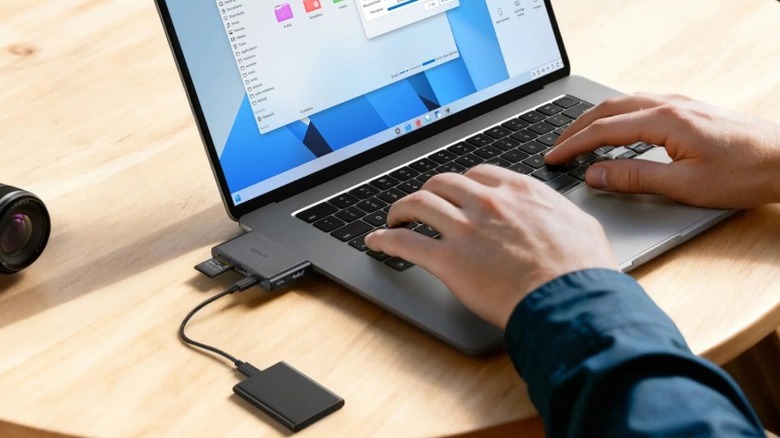
The Anker 13-in-1 docking station features a modular, detachable design where a smaller 6-in-1 USB-C hub can be removed from the main base. This hybrid setup allows users to maintain a full triple-monitor workstation at home while carrying a compact, credit-card-sized hub with HDMI, USB, and SD slots for travel and mobile productivity.
Modular Design: The Detachable Hub Innovation
For years, the docking station market has been divided into two camps: the heavy bricks that live on your desk and the flimsy dongles that live in your laptop bag. Anker has finally bridged that gap with a piece of modular hardware that feels inspired by a Nintendo cartridge. The core of this system is a removable 6-in-1 USB-C hub that slides into a vertical base station. When docked, it acts as the "brains" of the operation, passing signals to the base's expanded array of ports. When you need to head to a meeting or a flight, you simply press an ejection button, and the hub pops out.
This detachable design is remarkably small—roughly credit-card sized—and fits easily into a pocket. Despite its size, the hub itself retains essential connectivity, including an HDMI port, USB-A and USB-C data ports, and SD/microSD card slots. It solves the "forgot my dongle" problem by ensuring your travel kit is literally a part of your home office setup.
The vertical base station provides the necessary weight and cable management to keep your desk tidy. Unlike traditional horizontal docks that slide around when you plug in a cable, this hybrid workspace docking station stays planted, thanks to the weighted base that anchors your permanent peripherals like keyboards, Ethernet, and external monitors. According to technical assessments, this modular design that includes a detachable, credit-card-sized 6-in-1 portable hub for on-the-go connectivity is one of the most efficient uses of space in the current market.
Triple Display Performance: Resolving the 4K Question
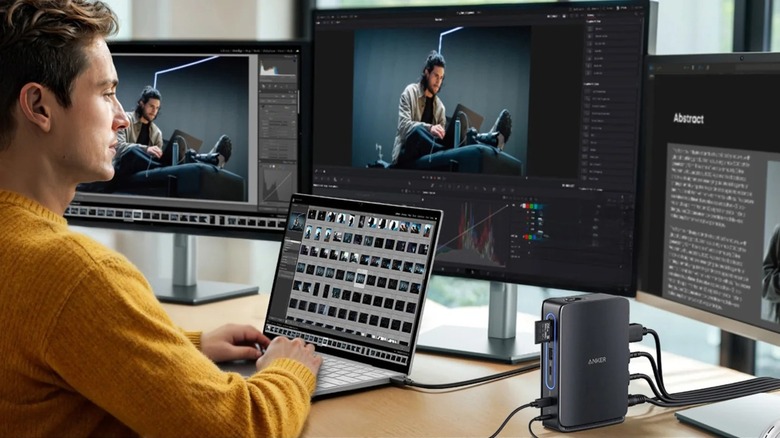
If you are looking to build a multi-screen command center, this triple monitor laptop docking station offers significant flexibility, though there are technical nuances you need to understand regarding bandwidth. The dock features two HDMI ports and one DisplayPort. If you are running a single external monitor, you can easily achieve 4K 60Hz resolution, provided your laptop supports DisplayPort 1.4 with Display Stream Compression (DSC).
However, physics and bandwidth limits apply when you start adding more screens. While the Anker 13-in-1 docking station supports resolutions up to 4K at 60Hz for compatible laptops, that resolution is shared. If you connect three monitors simultaneously, the resolution for each display will drop to 1920 x 1080 (1080p). This is a standard trade-off for non-Thunderbolt docks that rely on Multi-Stream Transport (MST) over a standard USB-C connection. For office work, spreadsheets, and coding, 1080p across three screens is often more than enough, but creative professionals working in high-resolution video editing might find the 4K single-monitor cap or the 1080p triple-monitor limit a bit restrictive.
| Number of Monitors | Maximum Resolution (DP 1.4 + DSC) | Connector Used |
|---|---|---|
| 1 Monitor | 4K (3840 x 2160) @ 60Hz | HDMI or DisplayPort |
| 2 Monitors | 2K (2560 x 1440) @ 60Hz | HDMI + HDMI / DP |
| 3 Monitors | 1080p (1920 x 1080) @ 60Hz | HDMI + HDMI + DP |
Connectivity and Power: 140W Input and Data Speeds
Power management is where the Anker 13-in-1 docking station truly excels. The unit comes with a substantial 140W power adapter. You might wonder why it needs 140W when it only provides up to 100W of Power Delivery to the host laptop. The reason is overhead; the dock itself needs power to run the 13 ports, maintain a Gigabit Ethernet connection, and power any peripherals you have plugged into the USB ports. This 100W power delivery performance ensures that even power-hungry workstations like the MacBook Pro 16 or high-end Dell XPS models stay charged under heavy workloads.
Anker has been strategic with its port layout, separating high-speed data from low-speed peripherals. This assists with cable management and ensures you aren't wasting a high-speed port on a mouse or keyboard.
Front vs. Rear
- Front (on the removable hub): One 10Gbps data transfer USB-C port, one 10Gbps USB-A port, and SD/microSD card slots (UHS-I). These are designed for quick-access items like flash drives and camera cards.
- Rear (on the base): Two 480Mbps USB-A ports (perfect for keyboard/mouse), a Gigabit Ethernet port for stable wired internet, and the three video output ports.
This separation means your permanent, slower cables stay tucked away at the back of your desk, while the fast, 10Gbps data transfer ports remain accessible on the front-facing removable 6-in-1 USB-C hub.
Compatibility Guide: Windows MST vs. macOS Mirror Mode
As an editor, I have to be honest: the experience of using this Anker 13-in-1 docking station varies wildly depending on your operating system. For Windows users, the dock is a dream. It utilizes Multi-Stream Transport (MST) to allow for three independent external displays. You can have your laptop screen showing Slack, one monitor showing your browser, another showing a document, and a third showing your video feed. It is a true extension of your workspace.
For macOS users, the story is different. Apple’s limited support for MST over standard USB-C means this dock defaults to macOS Mirror Mode. This means that while you can plug in three external monitors, they will all show the exact same content. Your laptop screen remains independent, but your external setup is essentially just one big mirrored display. If you are a Mac user who only needs one external 4K monitor, this dock still works great. But if you were hoping for a triple-monitor setup on a MacBook, you would be better off looking at a more expensive DisplayLink-certified dock.
| Feature | Windows Support | macOS Support |
|---|---|---|
| Single 4K @ 60Hz | Supported | Supported |
| Triple Independent Displays | Supported (MST) | Not Supported (Mirror Mode Only) |
| Power Delivery (100W) | Supported | Supported |
| Plug-and-Play Setup | Yes (No drivers needed) | Yes (No drivers needed) |
The setup is entirely driverless, which is a massive plus for corporate users who aren't allowed to install third-party software on their machines. You simply plug the upstream USB-C cable into your laptop, and the hardware handles the rest.
FAQ
How many monitors does the Anker 13-in-1 docking station support?
The docking station supports up to three external monitors simultaneously using its two HDMI ports and one DisplayPort. When three monitors are connected to a Windows laptop, they can each function as independent displays, though the resolution will be limited to 1080p for each screen to stay within the bandwidth limits of the USB-C connection.
Is the Anker 13-in-1 docking station compatible with MacBook?
Yes, it is compatible with MacBook for charging, data transfer, and internet connectivity. However, due to macOS limitations regarding Multi-Stream Transport (MST), MacBook users will find that all connected external monitors will mirror each other. You cannot extend your desktop across multiple independent external screens on a Mac with this specific dock.
Does the Anker 13-in-1 docking station provide power delivery?
The dock provides up to 100W of Power Delivery to the host laptop via the primary USB-C upstream port. This is supported by a 140W wall adapter, ensuring the dock has enough power to charge the laptop while simultaneously powering all connected peripherals, including hard drives and the Ethernet port.
What ports are available on the Anker 13-in-1 docking station?
The dock features a total of 13 ports. On the removable hub, you have one USB-C (10Gbps), one USB-A (10Gbps), one HDMI, and SD/microSD card slots. The base station adds another HDMI port, a DisplayPort, two USB-A (480Mbps) ports, a Gigabit Ethernet port, and the DC-in and upstream USB-C ports for the laptop connection.
Does the Anker 13-in-1 docking station support dual 4K displays?
The dock can support dual displays, but the resolution depends on the laptop's capabilities. If your laptop supports DP 1.4 with DSC, you can achieve resolutions higher than 1080p on two screens (typically 2K at 60Hz). However, dual 4K at 60Hz is generally not possible on this specific non-Thunderbolt model; usually, one screen will hit 4K while the second is limited to a lower resolution.
Final Verdict: Is the Nano Dock Worth It?
At a price point typically ranging between $110 and $149, the Anker 13-in-1 docking station is an exceptional value for the right user. It effectively eliminates the need to buy two separate pieces of hardware—a desk dock and a travel hub. The build quality is exactly what we’ve come to expect from the Anker Nano line: sleek, reliable, and thermally efficient.
For the hybrid professional who uses a Windows laptop, this is a no-brainer. The ability to have a full triple monitor laptop docking station at home and then "eject" a lightweight hub for the road is a productivity boost that’s hard to overstate. It simplifies your life by keeping your essential ports consistent across both environments.
However, if you are a macOS user who needs multiple independent external screens, or a hardcore gamer/creative who absolutely requires triple 4K monitors, you will likely need to spend double the price on a Thunderbolt 4 or DisplayLink alternative. For everyone else looking for a smart, hybrid workspace docking station that masters both the desk and the commute, the Anker Nano Dock is a standout innovation in a crowded field.