Quick Facts
- Top Safety Pick: Weather on the Way for real-time radar routing and hazard avoidance.
- Best Value: Libby provides access to thousands of free library audiobooks with a local card.
- EV Essential: PlugShare provides the most comprehensive monitoring across 48+ charging networks.
- Budget Tip: GasBuddy is the industry standard for fuel price tracking and station finding.
- Productivity: Zoom allows for professional road meetings via a safe audio-only interface.
- Hardware Hack: A wireless CarPlay adapter is the best way to ensure a clutter-free dashboard.
- Market Insight: Approximately 83% of Americans aged 18 and older with the technology in their vehicle now use it regularly.
In 2026, the best CarPlay road trip apps focus on safety and real-time utility, specifically targeting weather-aware navigation, EV charging networks, and budget-friendly entertainment like Libby. These specialized CarPlay road trip apps improve travel efficiency by providing real-time traffic, weather, and hazard alerts directly on the vehicle's dashboard interface.
As of 2026, CarPlay road trip apps have evolved from simple maps to comprehensive travel assistants. Whether you are hunting for free audiobooks or real-time weather routing, the right apps transform your infotainment system into a co-pilot. Here is our expert selection of the 5 essential tools for your next long haul.
Weather on the Way: Safety Through Real-Time Radar
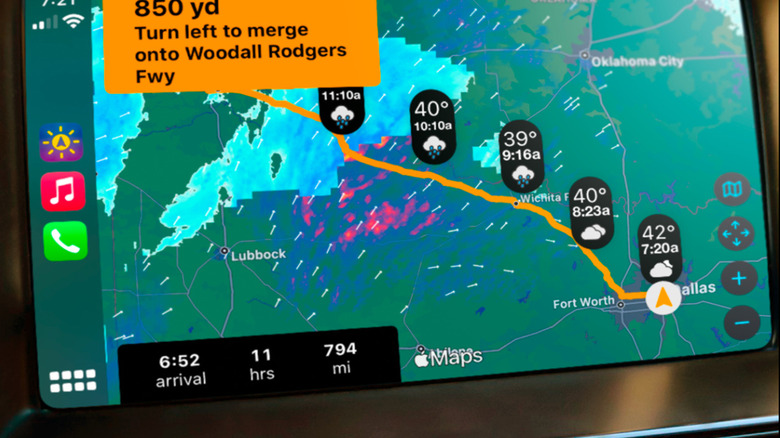
Traditional navigation tells you where to turn, but it rarely tells you what the sky looks like five miles ahead. This is where Weather on the Way has become a game-changer for long-distance drivers. Unlike standard weather apps that give you a static forecast for a single city, this app calculates the weather based on your exact arrival time at various points along your route.
The app overlays real-time weather radar directly onto your navigation path. If there is a severe thunderstorm or a localized hailstorm brewing 30 minutes ahead, the interface alerts you visually and suggests a departure time that avoids the worst of the conditions. This concept of weather-aware navigation is the ultimate safety feature for anyone crossing state lines or driving through mountain passes where conditions shift in minutes.
Using weather routing apps for CarPlay helps mitigate the stress of driving in low visibility. By utilizing Siri voice commands, you can ask for weather updates at your destination or mid-point without ever looking away from the road. This hands-free interaction ensures that you stay informed about real-time weather routing apps for CarPlay while maintaining focus on the asphalt.
Best for: Storm Chasing and Route Safety
For those who prioritize safety, this is the most essential of all CarPlay road trip apps. It provides a level of foresight that standard GPS simply cannot match, turning your dashboard into a meteorological station that keeps your family out of harm's way.
Libby: The Secret to Free High-Quality Audio Entertainment
While premium subscription services like Audible are excellent, the savvy 2026 traveler knows that the best audiobook apps for CarPlay don't always require a monthly fee. Libby connects you to your local public library's digital collection, allowing you to borrow audiobooks and magazines for free.
With a partnership spanning over 22,000 libraries, Libby provides a seamless integration into the CarPlay interface. The dashboard controls are simplified for the driver, featuring large skip-back buttons (perfect for when you miss a sentence due to a complex highway merge) and smart playback speed adjustments. Because the content is tied to your library card, you can line up a dozen titles before you leave your driveway, ensuring hundreds of hours of entertainment without spending a dime.
Finding free audiobook apps compatible with CarPlay can be a challenge, but Libby sets the standard by offering high-fidelity streaming and offline listening. This is particularly useful in "dead zones" where cellular data might drop out. You simply download your loans to your iPhone beforehand, and the CarPlay interface handles the rest.
Best for: Budget-Conscious Bookworms
If you want to consume a 40-hour epic fantasy series or catch up on the latest thrillers during a cross-country haul, Libby is the most cost-effective solution available in the app store today.
PlugShare and GasBuddy: Optimizing Your Energy Stops
The transition to electric vehicles has changed the way we plan stops. For EV owners, PlugShare is the gold standard for EV charging map apps for CarPlay. It monitors over 48 different charging networks, including the Tesla Supercharger network, Electrify America, and smaller regional providers. The CarPlay integration allows you to filter for specific plug types and charging speeds while you are on the move.
For those still driving internal combustion engine vehicles, GasBuddy remains an indispensable tool for tracking live fuel prices. The app helps you avoid the "highway premium" by showing you the cost of gas at stations just a mile or two off the main exit. Using CarPlay apps for tracking gas prices and fuel stops can save the average road tripper significant money over a multi-day journey.
Both apps excel at reducing "range anxiety"—whether that range is measured in kilowatts or gallons. The dashboard interface makes it easy to tap a nearby station and immediately route your GPS to that location. In 2026, having an EV charging station finder apps for CarPlay is no longer a luxury; it is a necessity for cross-country travel.
Best for: EV Range Confidence and Fuel Savings
Whether you are trying to find the cheapest premium gas or a high-speed DC fast charger that is actually functional, these energy-management tools provide the real-time data needed to keep your vehicle moving efficiently.
Zoom for CarPlay: Safe Professional Productivity
Remote work has made it possible to stay on the road longer, but it often necessitates taking professional calls from the driver's seat. Zoom for CarPlay solves this with a strict "Audio-Only" safety constraint. You won't see any video feeds on your dashboard; instead, you get a clean, distraction-free interface that allows you to join meetings with a single tap.
This version of the app is designed for hands-free communication. Siri manages your meeting invitations and can even read out upcoming calendar events. For the business traveler in 2026, this represents the peak of safe driving productivity. You can participate in a brainstorming session while navigating through rural Nebraska, provided you have a stable cellular connection.
Using voice controlled CarPlay apps for safe driving is the only way I recommend handling professional duties while behind the wheel. The app's integration ensures that your car's microphone and speaker system provide crystal-clear audio, which is far safer than fumbling with a headset or holding a phone.
Best for: Remote Professionals on the Move
If your road trip overlaps with a work week, Zoom allows you to stay connected without compromising your safety or the safety of others on the road.
Wireless Connectivity: The 2026 Hardware Essential
While software is the heart of the experience, the physical connection to your car matters just as much. A 2024 McKinsey survey revealed that 38% of car buyers would not even consider a vehicle that lacks support for Apple CarPlay. However, many older vehicles still require a USB cable, which can be cumbersome and prone to disconnection on bumpy roads.
To truly optimize your 2026 journey, I highly recommend investing in a wireless CarPlay adapter. Devices like the Ottocast Mini or similar high-speed dongles plug into your car's USB port and create a wireless bridge to your iPhone. This allows for a "start-and-go" experience where your CarPlay road trip apps appear on the infotainment system the moment you start the engine.
The benefit isn't just aesthetic. Continuous wired charging can actually overheat an iPhone during long summer drives when the sun is hitting the dashboard. Using a wireless connection allows you to keep your phone in a pocket or a ventilated center console, preserving your battery health and ensuring your navigation doesn't cut out due to thermal throttling.
FAQ
What are the best apps for road trips on CarPlay?
The best apps for long-distance travel on CarPlay are those that offer real-time utility beyond basic mapping. Weather on the Way is essential for storm avoidance, Libby provides free audio entertainment via your local library, and PlugShare or GasBuddy are necessary for energy management. For productivity, Zoom offers a safe, audio-only interface for professional calls.
How do I add new travel apps to Apple CarPlay?
To add apps to your CarPlay interface, you must first download the compatible app onto your iPhone from the App Store. Once installed, you can organize the layout by going to Settings > General > CarPlay on your iPhone, selecting your vehicle, and tapping Customize. This allows you to add, remove, or rearrange how your travel apps appear on the dashboard.
Can you use offline maps with CarPlay?
Yes, you can use offline maps through apps like Google Maps and Apple Maps. You must download the specific map area to your iPhone while you have an active internet connection. Once downloaded, these maps will function via the CarPlay interface even when you are driving through remote areas with no cellular service, though live traffic alerts will be disabled.
Which gas-finding apps are compatible with CarPlay?
GasBuddy is the most popular and feature-rich gas-finding app compatible with CarPlay. Other alternatives include Waze, which integrates fuel prices into its navigation, and Apple Maps, which allows you to search for fuel along your route using Siri voice commands. These apps help you find the nearest and most affordable fuel stops directly from your dashboard.
Are there weather apps available on CarPlay?
Yes, there are several weather apps specifically designed for CarPlay. Weather on the Way is a top recommendation for its route-based radar, while Weatherology provides real-time audio weather reports based on your current GPS location. Unlike standard weather apps, these are optimized for the dashboard interface to provide information without distracting the driver.