Quick Facts
- Host Requirement: An active iCloud+ subscription is mandatory to create and host events.
- Guest Accessibility: Free to use for guests via the native iOS app or a secure web portal for non-Apple users.
- Visual Customization: Utilizes generative AI and Apple Intelligence to create unique, festive event themes.
- Logistics Integration: Features built-in Apple Maps for navigation and real-time weather forecasts for the event date.
- Social Tools: Includes automated shared iCloud photo albums and collaborative Apple Music playlists.
- Cross-Platform Support: Android users can RSVP, view details, and download calendar files via a web-based interface.
Planning a holiday gathering shouldn't feel like a full-time job. With the Apple Invites app, you can move away from messy group chats and into a centralized event hub. Whether you're tracking RSVPs or sharing memories, this guide covers everything you need to know. The Apple Invites app is a first-party event coordination tool for iOS and iCloud.com that allows users to create themed invitations with integrated photo and music options. To host an event and unlock features like guest list management and custom themes, a host requires an active iCloud+ subscription.
Setting the Festive Vibe: Creating Your Event
The holiday season is famously chaotic, and the last thing any host wants is a fragmented planning process spread across three different messaging apps and an old-school email thread. According to a 2024 report, 57% of U.S. adults plan to host a holiday gathering, and the expectation for a seamless experience has never been higher. When you begin your journey in the Apple Invites app, the first thing you will notice is the speed of setup, often referred to as Time-to-Sent efficiency. Instead of wrestling with complex design software, you can leverage built-in templates or use generative AI to create custom imagery that perfectly fits your specific holiday mood.
Customizing Apple Invites themes for festive events is surprisingly intuitive. If you are hosting a "Winter Wonderland" dinner or a "Kitsch Christmas" sweater party, the app allows you to input keywords to generate unique header images. This ensures your invitation doesn't look like every other generic digital card landing in your guests' inboxes. Market research from 2024 indicates that 36% of respondents consider digital and printed invitations to be equally appealing, and that preference rises to 46% for Gen Z users. By choosing a digital invitation platform that offers high-end visual customization, you are meeting your guests exactly where they are.
Beyond the visuals, the core of how to plan a holiday party using Apple Invites app lies in the interactive event details. You aren't just sending a static image; you are creating a live portal. In the description field, you can include essential information like dress codes or "Secret Santa" rules. Because this is a first-party Apple tool, it pulls in data from your contact list and calendar seamlessly, ensuring that the Apple Invites app iCloud+ hosting requirements explained during your first setup are the only real hurdle you’ll face. Once that subscription is active, the world of high-end event coordination software is at your fingertips.
Pro-Tip: When writing your event description, keep it concise but utilize the "important notes" section for dietary restrictions. This keeps the main invitation clean while ensuring you have the data needed for catering.
Managing Your Guest List: RSVP Tracking & Android Support
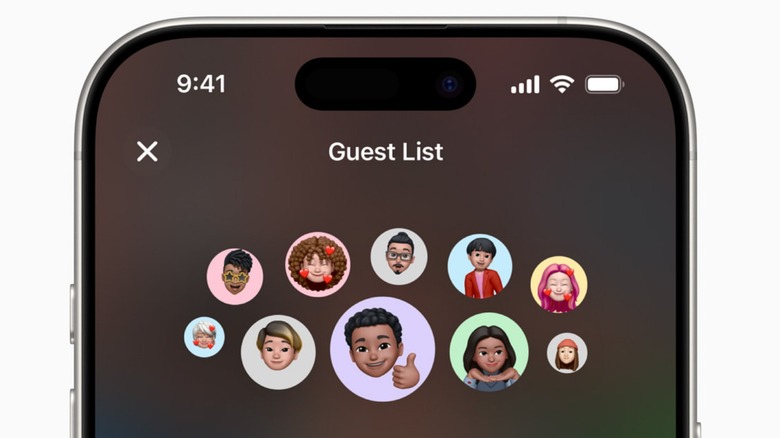
One of the biggest headaches in event planning is the "maybe" pile. Apple Invites RSVP tracking simplifies this by providing a real-time dashboard where you can see exactly who has viewed the invitation and who has confirmed their attendance. This is particularly useful for Millennials, who are estimated to spend more on holiday hosting than any other generation, with an average seasonal budget of $878. When you are spending that kind of money on a holiday spread, knowing your exact guest count is a financial necessity, not just a social one.
A common concern when using an Apple-centric tool is what happens to friends and family who use other devices. The Apple Invites for Android users experience is designed to be as frictionless as possible. While there is no dedicated app on the Google Play Store, non-iPhone users receive a text or email link that opens in a high-quality cross-platform web portal. From there, they can verify their identity, RSVP, and even add the event to their Google or Outlook calendars.
Managing Apple Invites guest lists for Android users is handled entirely through this web interface. As a host, you can send direct updates or "notes" to your entire guest list. These updates appear as push notifications for iOS users and as SMS or email updates for those on the web portal. This ensures that if the party start time shifts by thirty minutes, no one is left standing outside in the cold. This real-time notifications system acts as the heartbeat of your event, keeping everyone in the loop without the noise of a 20-person group text where the actual details get buried under a mountain of memes.
The Day-Of Dashboard: Maps, Weather, and Music
As the date of your gathering approaches, the Apple Invites app transitions from a planning tool into a day-of logistics hub. One of the most underrated features is the integration of location-based services. Because the app is tied directly into Apple Maps, guests can tap the address in their invitation to get turn-by-turn directions, including real-time traffic updates. If they are running late, they can share their ETA directly through the event portal.
Weather is another critical factor for holiday hosting. The app provides a localized weather forecast for the specific location of your event, starting ten days out. This is a game-changer for hosts who are deciding whether to set up the bar on the patio or move the entire celebration into the living room. Having this data inside your event coordination software saves you the step of constantly checking a separate weather app and then manually updating your guests.
To set the mood, the platform allows for a collaborative Apple Music playlist. This isn't just a static list of songs; it’s an interactive experience where guests can add their favorite holiday tracks before they even arrive. It builds anticipation and ensures that the music reflects the collective taste of the group rather than just the host’s personal preferences. It’s these small touches that elevate a simple dinner into a memorable social event.
Keeping the Memory Alive: Post-Event Shared Albums
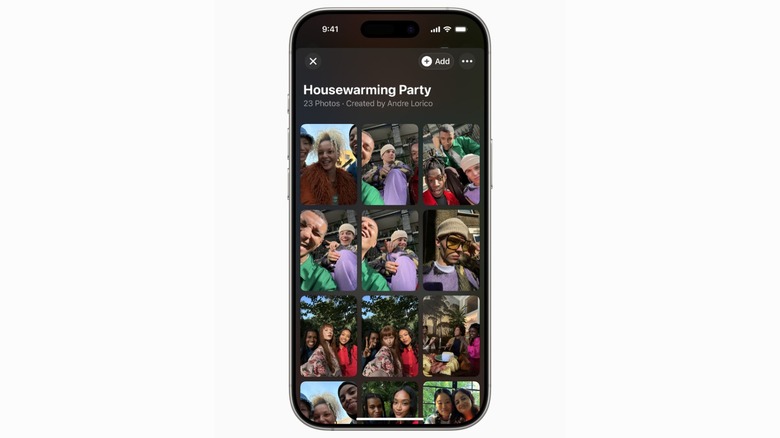
The party doesn't end when the last guest leaves. Traditionally, the days following a holiday gathering are filled with "Can you send me that photo?" texts. The Apple Invites app solves this through automated Apple Invites shared photo albums. Once the event start time arrives, a shared media gallery is created for all attendees.
Sharing holiday memories via Apple Invites shared albums is effortless because the app uses facial recognition and location metadata to suggest photos to guests that they might want to contribute. This means you get a 360-degree view of your party—shots of the food, the laughter in the kitchen, and the group photos you forgot to take on your own phone. These shared media galleries are private and secure, existing within the iCloud ecosystem, which is a significant advantage over posting private family moments on public social media platforms.
The event portal remains active long after the holidays are over, serving as a digital time capsule. Guests can return to the portal months later to download a specific photo or simply relive the highlights of the night. This multimedia collaboration turns a one-night event into a lasting memory, proving that the right technology doesn't just manage logistics—it enhances human connection.
FAQ
How do I send an event invitation on an iPhone?
To send an invitation, open the Apple Invites app, tap the plus icon to create a new event, and fill in your party details. Once you have customized your theme, you can select guests from your contacts and choose to send the invite via iMessage or email.
What is the best app for creating invitations on Apple devices?
The Apple Invites app is currently the top choice for users within the Apple ecosystem. It offers deep integration with iCloud, Maps, and Photos, providing a level of convenience and polish that third-party apps often struggle to match, especially when it comes to automated shared albums.
How do I manage event RSVPs on my iPhone?
Open your specific event within the app to see a comprehensive guest list. From here, you can see who has accepted, declined, or not yet responded. You also have the option to send a follow-up note to those who haven't replied to ensure your guest count is accurate.
Can I send party invitations through iMessage?
Yes, the app is built to work seamlessly with iMessage. When you send an invite via text, it appears as a rich media card that guests can tap to open the full invitation, view details, and RSVP without ever leaving the conversation thread.





