Our Top Picks
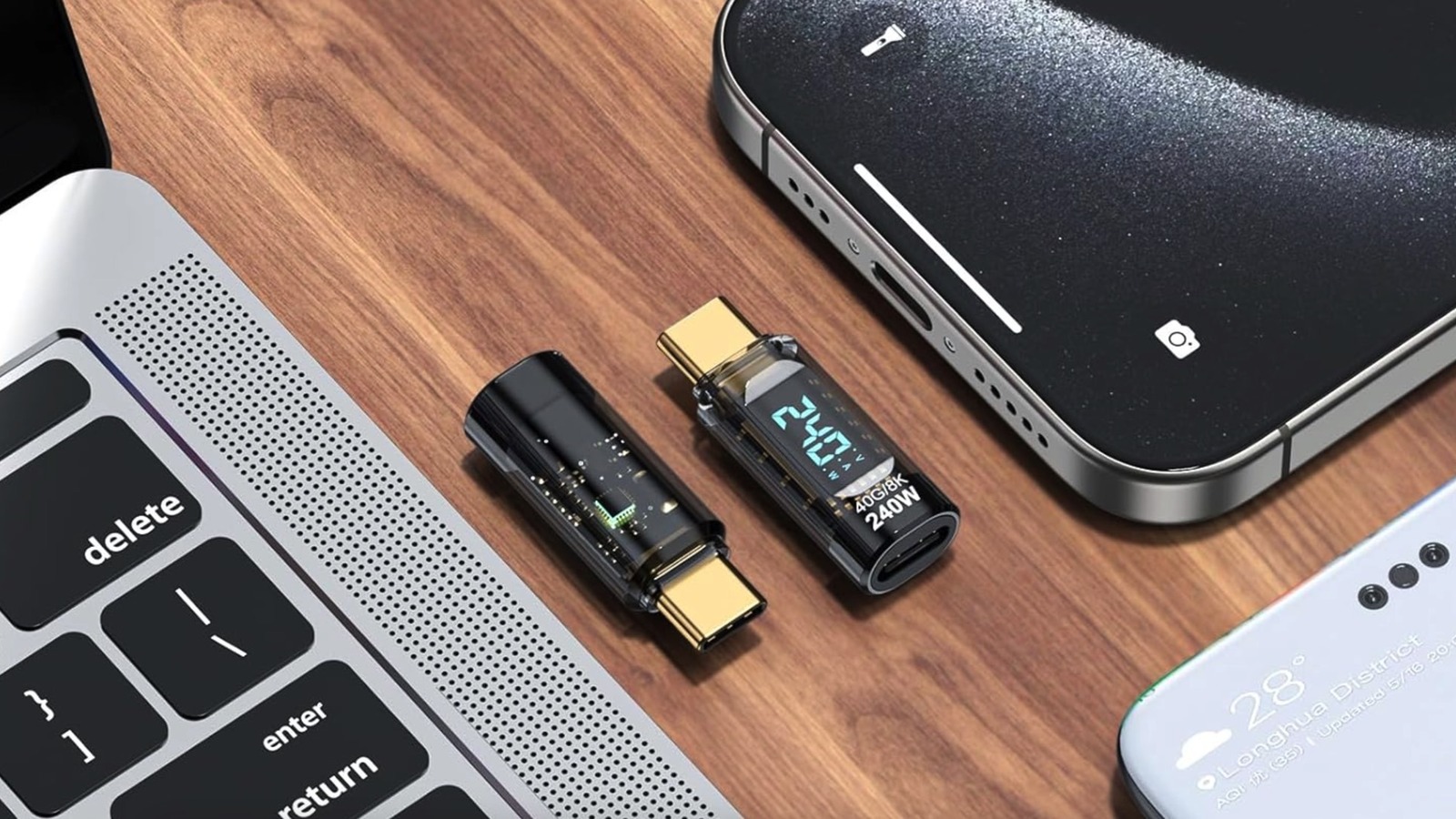
- The Budget Essential: MakerFocus USB-C Power Meter (2-Pack). Incredible value for basic diagnostics and verifying PD 3.1 speeds.
- The Enthusiast Upgrade: Klein Tools ET920. More rugged for job site use but offers similar wattage tracking for mobile tech.
- The Pro-Sumer King: Power-Z KM003C. High-resolution color display and detailed protocol analysis for those who need to see ripple and noise.
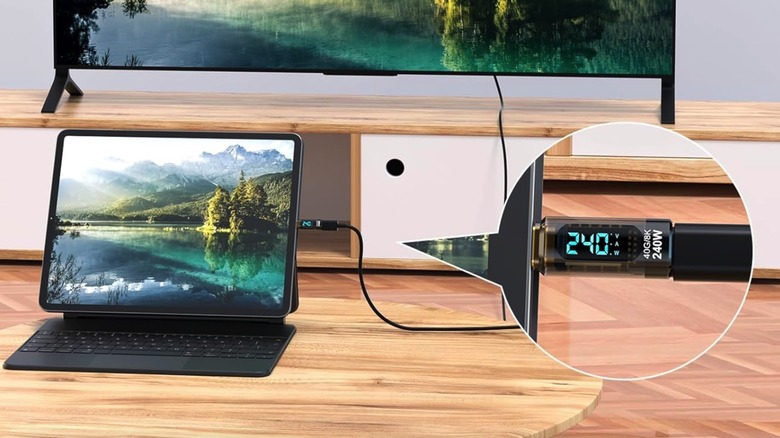
To test charging speed, plug the usb-c power meter directly into a port on your device or charger and connect the cable to the adapter's other end. The integrated display will automatically cycle through real-time wattage, voltage, and amperage readings, allowing you to verify if your power adapter and cable are delivering the expected fast-charging speeds for devices like smartphones or high-wattage laptops.
Why Every Tech User Needs a USB-C Wattage Monitor
We have all been there. You plug your smartphone into a high-end GaN charger using a sleek-looking braided cable, expecting to see that "Super Fast Charging" notification, only to realize an hour later that your battery has barely budged. In the confusing world of modern charging, the usb-c power meter is the only tool that can pull back the curtain on what is actually happening between your wall outlet and your device.
The frustration of slow charging is rarely about the device itself; it is usually a mismatch between the charger, the cable, and the charging protocol. As a mobile editor, I frequently see users blame their phones for poor battery performance when the culprit is actually a degraded cable or a sub-par port. By using a usb-c wattage monitor, you transform a guessing game into a portable tech diagnostic process. This $10 gadget provides an objective look at Charging Efficiency, showing you exactly how many watts are entering your device at any given second.
One of the most valuable uses for this tool is to identify quality usb-c cables with a power meter. Not all cables are created equal, even if they look identical from the outside. Some are limited to 60W, while others contain an E-Marker Chipset required to handle higher current. When you identify quality usb-c cables, you ensure that your premium hardware is actually receiving the power it was designed to handle, preventing the bottlenecking that occurs with cheap, uncertified accessories.
Mastering the PD 3.1 Era: Performance and Accuracy
Charging technology has evolved rapidly over the last few years. The USB Power Delivery (PD) 3.1 specification, introduced in 2021, allows compatible USB-C cables and connectors to deliver up to 240W of power, a significant increase from the previous 100W limit. This leap means we are now using USB-C to power everything from noise-canceling headphones to high-performance gaming laptops.
However, with higher power comes a greater need for monitoring. Knowing how to test usb-c charging speed with a power meter is essential for anyone using these high-wattage standards. A budget usb-c power meter allows you to observe Real-time Amperage and Voltage Fluctuations, which are key indicators of how well your charger is communicating with your device. If you see the voltage jumping erratically, it might be a sign that the charger is struggling to maintain a stable handshake, potentially leading to long-term battery degradation.
Accuracy in these $10 devices is surprisingly high for the price. While they may not offer the ten decimal places of a laboratory oscilloscope, they are more than sufficient to tell the difference between a 15W "standard" charge and a 45W "fast" charge. By monitoring the Wattage Capacity of your setup, you can ensure you are hitting the peak Fast Charging Protocols supported by your specific hardware.
Real-World Scenarios: From Hotel Ports to Car Chargers
The utility of a usb-c power meter extends far beyond your home office desk. When I travel, it is the first accessory I pack. We often rely on third-party infrastructure that we cannot control, such as the USB ports built into hotel nightstands or airplane seats. These ports are notoriously unreliable. By checking hotel usb-c port charging reliability while traveling, you can determine if a wall port provides sufficient wattage to charge a high-end laptop or if you need to use your own power adapter instead. Often, these built-in ports offer a measly 5W, which might not even keep a modern tablet powered while in use.
The same logic applies to your commute. Many modern vehicles come equipped with USB-C ports, but their output varies wildly. I have used a meter for testing car usb-c port output for fast charging in several newer models, only to find that the "fast" port was capped at 10W. If you are using navigation and streaming music, 10W might barely maintain your current battery level. Having a meter lets you know if you need to buy a separate high-speed cigarette lighter adapter.
Furthermore, for professionals using complex desk setups, measuring power delivery from laptop docking stations is a must. If you have multiple peripherals—monitors, external drives, and keyboards—connected to a single hub, the power being passed through to your laptop can drop significantly. A wattage monitor allows you to see exactly how much "juice" is left for your laptop after the dock takes its cut for the peripherals.
The Security Angle: Protecting Against Juice Jacking
While we usually think of a usb-c power meter as a performance tool, it also serves a secondary purpose as a security device. You may have heard of Juice Jacking, a type of cyberattack where public USB charging stations are modified to steal data or install malware on connected devices.
While most modern smartphones have software protections against data transfer over untrusted connections, a hardware monitor provides an extra layer of visibility. By monitoring Real-time Amperage, you can see if a port is drawing an unusual amount of power or if the connection remains active in a way that suggests data-pin activity rather than a simple power handshake. If you plug into a "power only" public port and see data-related fluctuations on your meter, it is a signal to unplug immediately. It is a simple, analog way to keep an eye on a digital threat.
Comparison: $10 Amazon Picks vs. Pro Multimeters
If you are looking for the best budget usb-c power meter on amazon, you will likely find several unbranded or white-labeled versions of the same core technology. For $10 to $15, these are excellent for everyday diagnostics. However, if you are a professional developer or a hardware reviewer, you might consider stepping up to a professional digital voltmeter.
| Feature | $10 Amazon Budget Meter | Pro Multimeter (e.g., Power-Z) |
|---|---|---|
| Price | ~$10 - $15 | $70 - $120+ |
| Wattage Support | Up to 240W (PD 3.1) | Up to 240W+ |
| Display | Simple LCD/OLED | High-Res Color TFT |
| Data Logging | None | PC Connection / Bluetooth |
| Protocol Detection | Basic (PD, QC) | Comprehensive (PPS, VOOC, SCP, etc.) |
| Accuracy | +/- 1-2% | +/- 0.1% or better |
| Best For | Daily troubleshooting | Engineering & Reviews |
The budget option excels in portability and ease of use. You don't need a manual to understand it; you just plug it in and read the numbers. While the professional tools can track things like Voltage Fluctuations and ripple over time, the $10 version gives you the most important data point: "Is my device actually fast-charging?"
FAQ
What does a USB-C power meter do?
A usb-c power meter is a pass-through diagnostic tool that measures the electrical current flowing from a power source to your device. It displays real-time data such as voltage, amperage, and total wattage. This allows users to troubleshoot charging issues, verify the speed of their chargers, and check the health of their cables.
How do I measure the wattage of a USB-C charger?
To measure the output, insert the usb-c power meter into the charger's port, then connect your charging cable to the other end of the meter and finally into your device. The device must be actively drawing power for the meter to show a reading. The wattage is calculated by the meter multiplying the voltage by the amperage in real-time.
Can a USB-C power meter damage my device?
High-quality usb-c power meters are designed as passive pass-through devices and should not damage your electronics. They do not alter the voltage; they simply measure it. However, it is important to buy a meter that is rated for the wattage you intend to test, such as a model that supports the 240W Power Delivery 3.1 standard, to ensure it can handle the current without overheating.
Are USB-C power meters accurate?
For general consumer use, a budget usb-c power meter is very accurate, typically within a 1-2% margin of error. This is more than enough to confirm if a 65W charger is performing as advertised or if a cable is limiting your speed. Professional-grade meters offer higher precision and data logging for laboratory environments, but the average user will find the $10 versions perfectly reliable.
Do USB-C power meters support Power Delivery (PD)?
Yes, most modern usb-c power meters found on Amazon are built to support the Power Delivery (PD) protocol. Many of the newer, affordable models are updated to support PD 3.1, allowing them to track high-wattage charging for laptops and tablets. Always check the product description to ensure it supports the specific wattage range of your devices.
Conclusion
In an era where every manufacturer seems to have their own proprietary "fast charging" standard and USB-C cables all look identical, the usb-c power meter is the ultimate truth-teller. For the price of a couple of cups of coffee, this $10 Amazon find saves you hours of frustration by identifying why your devices are charging slowly. Whether you are checking hotel usb-c port charging reliability while traveling or trying to identify quality usb-c cables in a junk drawer, this tool provides professional-level insight for a bargain price. I recommend buying a two-pack—keep one in your travel bag and one at your home charging station—to ensure you are always getting the most out of your mobile tech.